
Best Android TV box for TiviMate in 2026: our 4 picks
By TiviMatePremium.shop · Updated 28 October 2026
The best Android TV box for TiviMate in 2026 is the Google TV Streamer for most homes: 4GB of RAM, 32GB of storage and Gigabit Ethernet on Google's own spec sheet. The NVIDIA SHIELD TV Pro suits big libraries, the Formuler Z11 Pro Max suits IPTV-first homes, and the SHIELD TV is the compact pick.
In short
- Four boxes make our list because every spec comes from the maker's own page: Google TV Streamer, SHIELD TV Pro, SHIELD TV and Formuler Z11 Pro Max.
- TiviMate is built for Android TV and a remote, so a box beats a phone, and Gigabit Ethernet beats Wi-Fi for 4K.
- Samsung and LG TVs run Tizen and webOS, so they need one of these boxes for TiviMate, or another player app.
| Our overall pick | Google TV Streamer |
|---|---|
| For big libraries | NVIDIA SHIELD TV Pro |
| IPTV-first box | Formuler Z11 Pro Max |
| Compact choice | NVIDIA SHIELD TV |
| How we chose | Official spec pages only |
Short answer
Pick the Google TV Streamer if you want one box that does everything well: Google lists 4GB of RAM, 32GB of storage and a 1Gbps Ethernet port. Pick the NVIDIA SHIELD TV Pro for USB storage and a big library, the Formuler Z11 Pro Max if IPTV is the main thing you watch, and the NVIDIA SHIELD TV if you want the smallest box with Gigabit Ethernet. Every figure on this page comes from the maker's own spec page, listed under Sources.
This is our list of the best Android TV box for TiviMate in 2026, and it is deliberately short. We only recommend a box when its maker publishes the specs that matter for IPTV, so you can check every number yourself. We give no prices, because they change by shop and by country, and no scores, because a spec sheet is not a review. What you get instead is the reasoning: which specs make TiviMate feel fast, which box fits which home, and how to set it up with our Android TV setup guide once it arrives.
Why TiviMate wants an Android TV box
TiviMate's Google Play listing says the app "is designed for Android TV and remote control navigation" and that "it is not optimized for touch devices such as phones or tablets." That one line decides what the best Android TV box for TiviMate looks like. TiviMate is happiest on a box or stick that runs Android TV or Google TV, plugged into the TV and driven with a remote. It installs from Google Play on those devices, and the developer also offers a direct download through the Downloader code 272483 or tivimate.com/apk.
A box also solves a common problem: smart TVs that cannot run TiviMate at all. Samsung says Tizen "powers all Samsung Smart TVs", and LG says its TVs released after 2014 run webOS with apps from the LG Content Store. Neither system runs Android apps, so on those TVs you either add a box from this list or use another player, as our Samsung and LG smart TV guide explains.
TiviMate itself is only the player. It "does not provide any content", in the developer's own words, so you load a playlist from an IPTV service into it. Ours comes as an Xtream Codes login and an M3U link, and our IPTV plans for TiviMate start from $4.16/mo for one screen. If you are new to the app, what TiviMate Premium is covers the free app versus the paid upgrade.
The four specs that matter for IPTV
Most box spec sheets list a dozen lines. For TiviMate with a live TV playlist, four of them do the real work. The rest, such as HDR formats and audio codecs, matter for the picture and sound of what you watch but do not change how smoothly the app runs.
RAM: how fast the guide and channel list feel
A large IPTV playlist holds thousands of channels plus a full TV guide. RAM is what keeps that list and the programme grid quick to scroll. Between 2GB and 4GB covers the boxes on this list; more RAM gives more headroom for big playlists, several apps open at once, and features like TiviMate's Multiview, which plays several channels on one screen (see our TiviMate Multiview post).
Storage: room for the app, updates and recordings
TiviMate lists recording among its features: "Record your favorite shows to watch later". TiviMate does not document where recordings are kept, so more built-in storage, or a USB or microSD slot, simply gives you more room either way. Our catch-up and recording guide covers how recording works and the storage tips that apply on any device.
Gigabit Ethernet: the single best fix for buffering
A 4K stream needs about 25 Mbps per screen on our service, Full HD about 10 and SD about 5. A cable to the router delivers that far more steadily than Wi-Fi through walls. All four picks have a Gigabit Ethernet port built in, which is a big reason they beat most sticks for IPTV. Run our IPTV speed test on the TV's connection before you decide whether you need it.
Wi-Fi: when a cable is not an option
If the box has to sit far from the router, a newer Wi-Fi standard and a 5 GHz connection help. Google lists Wi-Fi 802.11ac on 2.4GHz and 5GHz for the Streamer, and Formuler lists "AX 2x2" for the Z11 Pro Max, which is Wi-Fi 6. Google's own advice for streaming devices is plain: "Move your router to within 20 feet of your streaming device" or "Use an Ethernet adapter".
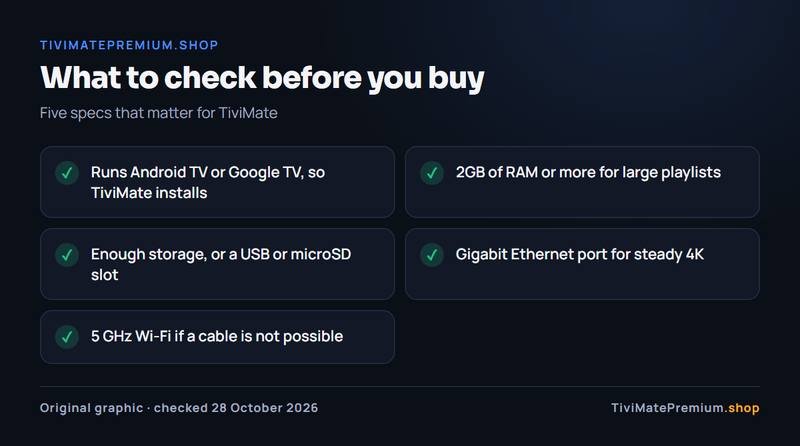
- Runs Android TV or Google TV, so TiviMate installs
- 2GB of RAM or more for large playlists
- Enough storage, or a USB or microSD slot
- Gigabit Ethernet port for steady 4K
- 5 GHz Wi-Fi if a cable is not possible
Best Android TV box for TiviMate: the specs side by side
Each row below comes from the maker's own page, checked on 28 October 2026. Where a maker does not list a figure, we leave it out rather than guess.
| Box | System | RAM | Storage | Ethernet | Expansion |
|---|---|---|---|---|---|
| Google TV Streamer | Google TV (Android TV OS) | 4GB | 32GB | 1Gbps (RJ45) | Not listed |
| NVIDIA SHIELD TV Pro | Android 11, Android TV | 3 GB | 16 GB | Gigabit | Two USB 3.0 ports |
| Formuler Z11 Pro Max | Android 11 | 4GB DDR4 | 32GB eMMC | Gigabit (1000M) | One USB 3.0, one USB 2.0 |
| NVIDIA SHIELD TV | Android 11, Android TV | 2 GB | 8GB | Gigabit | MicroSD card slot |
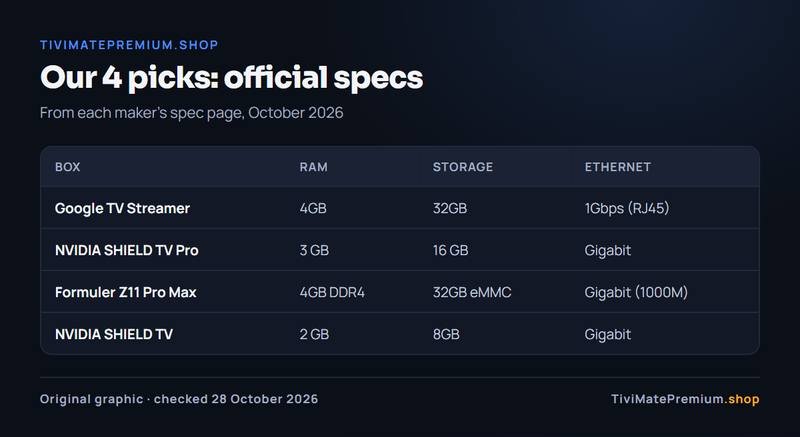
Two boxes tie on memory and storage: the Google TV Streamer and the Formuler Z11 Pro Max both list 4GB and 32GB. The SHIELD TV Pro has less built-in storage but the most expansion, with two USB 3.0 ports. The SHIELD TV is the lightest spec here, yet it still has Gigabit Ethernet and a microSD slot, which many sticks lack.
Our 4 picks, one by one
1. Google TV Streamer: our overall pick
Google's spec page lists 4GB of memory, 32GB of storage, "Ethernet via RJ45 1Gbps", Wi-Fi 802.11ac, HDR10, HDR10+, HLG and Dolby Vision, and Dolby Atmos sound. It runs Google TV, so TiviMate comes straight from Google Play with no sideloading. Google Store lists it for sale in the United States, the United Kingdom, Canada, France and Germany, which makes it the easiest box to recommend in every market we serve. For most people it is the best Android TV box for TiviMate today.
Choose the Google TV Streamer if you want the simplest setup, plenty of memory for a big playlist and a Gigabit port, in any of our five markets.
2. NVIDIA SHIELD TV Pro: for big libraries
NVIDIA lists a Tegra X1+ processor with a 256-core GPU, 3 GB of RAM, 16 GB of storage, Gigabit Ethernet and two USB 3.0 Type A ports. It runs Android 11 with Android TV, and NVIDIA lists AI-enhanced upscaling up to 4K. The USB ports are what set it apart: a drive gives you room that the built-in storage on most boxes cannot. Our NVIDIA SHIELD section covers the install.
Choose the SHIELD TV Pro if you keep a large library, want USB storage, or use other heavy apps on the same box.
3. Formuler Z11 Pro Max: the IPTV-first box
Formuler lists Android 11, a Realtek RTD1319C processor, 4GB of DDR4 RAM, 32GB of eMMC storage, Gigabit Ethernet, Wi-Fi AX 2x2, one USB 3.0 and one USB 2.0 port. It ships with Formuler's own IPTV app, MYTVOnline3, so you can watch through either app. Our Formuler IPTV setup guide shows both routes, TiviMate and MYTVOnline3, with the same login.
Choose the Formuler Z11 Pro Max if IPTV is the main thing the box is for and you like having a second IPTV app built in.
4. NVIDIA SHIELD TV: the compact pick
The smaller SHIELD TV has the same Tegra X1+ processor with 2 GB of RAM, 8GB of storage, Gigabit Ethernet and a microSD card slot, on Android 11 with Android TV. It is the lightest box on this list, but it keeps the one thing that matters most for IPTV, a wired connection, and the microSD slot gives you more room later.
Choose the SHIELD TV if you want a small box that hides behind the TV and still plugs into the router.
Which box for which home
The best Android TV box for TiviMate depends on how you watch, so start there rather than from the spec sheet. The table matches common homes to the pick that fits best.
| Your home | Our pick | Why |
|---|---|---|
| One main TV, mixed use | Google TV Streamer | 4GB RAM, 32GB, Gigabit, Google Play built in |
| Large library, many recordings | NVIDIA SHIELD TV Pro | Two USB 3.0 ports for a drive |
| Mostly live TV and IPTV | Formuler Z11 Pro Max | 4GB RAM, MYTVOnline3 built in |
| Small space, wired router | NVIDIA SHIELD TV | Compact, Gigabit, microSD slot |
| Router far from the TV | Formuler Z11 Pro Max | Wi-Fi AX 2x2 (Wi-Fi 6) on its spec sheet |
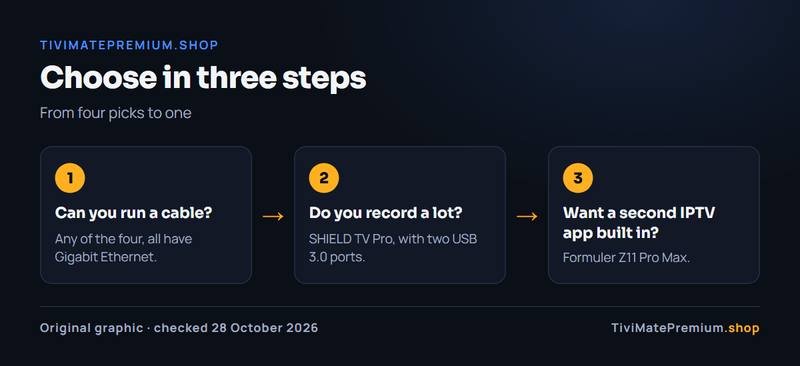
- Can you run a cable? Any of the four, all have Gigabit Ethernet.
- Do you record a lot? SHIELD TV Pro, with two USB 3.0 ports.
- Want a second IPTV app built in? Formuler Z11 Pro Max.
Watching on more than one TV? Each box is one screen, and our plans are counted the same way: one device means one screen watching at a time. Our multi-device IPTV plans cover up to three screens on one subscription.
Alternatives: a stick, a Google TV, or another app
A Fire TV stick instead of a box
A stick costs less space and plugs straight into the TV. The Fire TV Stick 4K Max (2nd Gen) runs Fire OS 8 with 2GB of RAM, 16 GB of storage and Wi-Fi 6E, according to Amazon's spec page, and Ethernet needs an external adapter. Be careful with the newest Amazon sticks: the Fire TV Stick 4K Select, the Fire TV Stick HD (2026) (Wi-Fi 6, rounded corners, "Fire TV" printed on the stick) and the Fire TV Stick 4K - 3rd Gen (2026) (white box, "4K" printed next to the HDMI plug) run Vega OS and cannot install TiviMate. To check, open Settings › My Fire TV › About (on newer menus, Settings › Device › Fire TV) and read the software version: "Fire OS" means TiviMate installs; "OS" followed by a number starting with 1 or 2 means Vega OS. Our best Firestick for TiviMate post explains which models still work, and the TiviMate on Firestick guide walks through the install.
A TV with Google TV built in
Google lists Hisense, Philips, Sony and TCL among its Google TV partner brands, and TCL says you can get apps "through the Play Store app" on its Google TV sets. If your TV already runs Google TV, you may not need a box at all: TiviMate installs from Google Play on the TV itself, as in our Google TV section. A box still helps when the TV has no Ethernet port or feels slow with a large playlist.
Boxes we left out
You will see other boxes in shops, such as onn boxes in the US and the Xiaomi TV Box S (3rd Gen) in the UK and France. They may work well, but we could not open the makers' spec pages to confirm their figures, so they are not in our list of the best Android TV box for TiviMate. We will add a box only when its maker's own page backs up every spec we print.
Keep your Samsung or LG and use another app
On a Tizen or webOS TV you can skip the box and use a player that runs there, such as IPTV Smarters or IBO Player. Our best IPTV player apps guide compares them, and the TiviMate vs IBO Player comparison shows what you give up.
Set up TiviMate on your new box
Once the box is connected, the setup takes about 10 minutes. Plug in Ethernet if you can, sign in to Google, and run any system update first: on Google TV that is Settings, System, About, System update, in Google's own help. Then follow these guides in order.
- Install TiviMate from Google Play with our Android TV setup guide.
- Add your Xtream Codes login or M3U link with the guide to adding a playlist in TiviMate.
- Load the TV guide and set your time zone with the TiviMate EPG guide.
- Tune playback with the best TiviMate settings, and keep the TiviMate buffering fixes handy.
Want TiviMate Premium? It is the app's paid upgrade, sold only by the developer, and the app's Unlock Premium screen shows how to activate it on a device. Our page on how to buy TiviMate Premium shows the official route, and the TiviMate Companion app unlocks Premium on devices without Google Play. We sell the IPTV subscription only, never TiviMate Premium.
Message us, and we guide you all the way to your first channel.
Daily support, usually within the hour.
Android TV box questions
What is the best Android TV box for TiviMate?
For most homes, the Google TV Streamer: Google lists 4GB of RAM, 32GB of storage and a 1Gbps Ethernet port, and TiviMate installs from Google Play. The SHIELD TV Pro suits big libraries, the Formuler Z11 Pro Max suits IPTV-first homes and the SHIELD TV is the compact choice.
Does TiviMate work on any Android TV box?
TiviMate is designed for Android TV and remote control navigation, so it runs on Android TV and Google TV boxes from Google Play or the developer's own download. A slow box with little RAM will still struggle with a large playlist, so check the specs in our table first.
Is Ethernet really better than Wi-Fi for TiviMate?
For 4K, usually yes. A 4K stream needs about 25 Mbps per screen on our service, and a cable delivers that more steadily than Wi-Fi through walls. All four boxes on our list have Gigabit Ethernet built in. Test your connection with our IPTV speed test.
Can I use TiviMate on a Samsung or LG TV without a box?
No. Samsung TVs run Tizen and LG TVs run webOS, and neither runs Android apps. Add an Android TV box or stick, or use a player made for those TVs, as our Samsung and LG smart TV guide explains. Any Android TV or Google TV device plugged into a spare HDMI port is enough to run the app on those TVs.
Do I need TiviMate Premium on a new box?
No, the app plays your playlist without it. Premium is the paid upgrade that unlocks extra app features, sold only by the developer on tivimate.com and in the Companion app. Channels always come from an IPTV subscription such as our plans for TiviMate.
Sources
Official pages we checked for the facts on this page, on 28 October 2026.
- TiviMate IPTV Player on Google Play (app description)
- tivimate.com (official TiviMate site)
- Google TV Streamer technical specifications (Google)
- Countries where Google Store devices are sold (Google)
- NVIDIA SHIELD TV specifications (NVIDIA)
- NVIDIA SHIELD TV Pro specifications (NVIDIA)
- Formuler Z11 Pro Max specifications (Formuler)
- Fire TV streaming media player specifications (Amazon)
- Google TV partner products (Google)
- Download apps on a TCL Google TV (TCL)
- Samsung Smart Hub and Tizen (Samsung)
- webOS user guide (LG)
- Fix Wi-Fi connection problems on streaming devices (Google)
- Fix problems with Google TV, system update path (Google)
Box picked? Add the channels.
Plans from $4.16/mo · Billed once, no auto-renew · 7-day money-back