
IPTV speed test: is your internet fast enough?
By TiviMatePremium.shop · Updated 28 October 2026
This IPTV speed test downloads a 10 MB file from our own server and shows your real download speed in Mbps. As a rule of thumb, each screen needs about 5 Mbps for SD, 10 Mbps for Full HD and 25 Mbps for 4K. Run it on the device you watch on, at the time you usually watch.
In short
- Each screen needs about 5 Mbps for SD, 10 Mbps for Full HD and 25 Mbps for 4K.
- Run the IPTV speed test on the TV device itself, or on a phone in the same spot on the same Wi-Fi.
- Below your target? Ethernet or 5 GHz Wi-Fi close to the router fixes most slow results.
| Test file | 10 MB, from tivimatepremium.shop |
|---|---|
| Passes | 2, the faster one counts |
| SD | About 5 Mbps per screen |
| Full HD | About 10 Mbps per screen |
| 4K | About 25 Mbps per screen |
Run the IPTV speed test
Press Start and wait a few seconds. The IPTV speed test downloads the same 10 MB file twice from tivimatepremium.shop and reports the faster pass, so a slow first connection does not drag the result down. The file is random data, so your network cannot compress it and flatter the number. Nothing is uploaded and no other server is contacted.
IPTV speed test
Downloads a 10 MB test file from tivimatepremium.shop, twice. Nothing is sent to other servers.
Press Start. The test takes from a few seconds to about half a minute, depending on your connection.
- Below SD under 5 Mbps
- SD ready 5+ Mbps
- Full HD ready 10+ Mbps
- 4K ready 25+ Mbps
Next: pick your device in the IPTV setup guides, or compare IPTV plans for 1 to 3 screens.
[{"min":0,"label":"Below SD","d":"Under 5 Mbps: expect buffering even in SD. Use Ethernet, move the device closer to the router, or restart the router and test again."},{"min":5,"label":"SD ready","d":"Enough for SD channels on one screen. For Full HD, switch to 5 GHz Wi-Fi or Ethernet and test again."},{"min":10,"label":"Full HD ready","d":"Enough for Full HD on one screen. For 4K, plug in Ethernet or use 5 GHz Wi-Fi close to the router."},{"min":25,"label":"4K ready","d":"Enough for one 4K stream. Each extra screen watching at the same time needs its own share of the speed."}]Tip. Open this page in the browser of the device you watch on when it has one, or on a phone held where the TV device sits, on the same Wi-Fi network. A laptop next to the router can show double the speed your Fire TV Stick behind the TV really gets.
What your result means for SD, Full HD and 4K
Our streams come in 4K, FHD and HD. The figures below are what one screen needs for smooth playback in each quality, with a little headroom for the moments when the stream peaks. If two people watch on two TVs at the same time, add the figures together: two Full HD screens need about 20 Mbps between them.
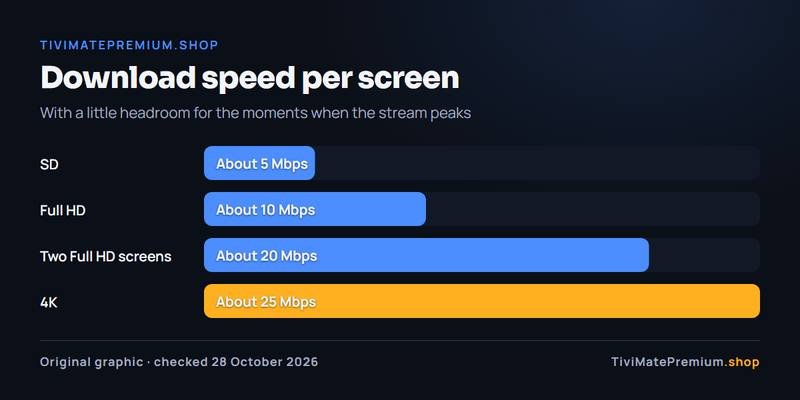
| Your result | What plays smoothly | What to do |
|---|---|---|
| Under 5 Mbps | Expect buffering, even in SD | Use Ethernet, move closer to the router or restart it, then test again |
| 5 to 9 Mbps | SD on one screen | Switch to 5 GHz Wi-Fi or Ethernet before trying Full HD |
| 10 to 24 Mbps | Full HD on one screen | For 4K, plug in Ethernet or move the router closer |
| 25 Mbps and up | 4K on one screen | Add about 10 Mbps for each extra Full HD screen at the same time |
A good result on this page is a strong sign, not a promise: the speed you pay your internet provider for is shared by every device in the house, and evening traffic in your area can lower it. That is why it pays to test at the time you normally watch, and to run the IPTV speed test again after you change anything.
How this speed test works
General speed test sites measure the line to a server near you, which is useful, but it is not the route your TV takes to an IPTV service. This tool times a download from our own domain, through the same kind of connection a stream uses, and turns bytes and seconds into megabits per second.
- Two passes: the first download warms up the connection; the faster of the two passes is the one you see.
- Your device, your Wi-Fi: the result includes the Wi-Fi hop between your router and the device, which is where most home problems sit.
- No account, no tracking: the test runs only when you press Start and stores nothing. Our site uses no tracking or advertising cookies.
- Download only: watching IPTV is almost all download, so upload speed and ping are not measured here.
How our figures compare with device and app makers
Our bands sit at or above what streaming device and app makers publish, because live IPTV channels cannot buffer far ahead the way a film on demand can. Here is what their help pages say, checked on 28 October 2026.
| Source | SD | HD or Full HD | 4K |
|---|---|---|---|
| Roku (network help) | 3 Mbps | 5 Mbps (HD) | 25 Mbps or more |
| Netflix (Help Center) | Not listed | 3 Mbps (720p), 5 Mbps (1080p) | 15 Mbps or higher |
| TiviMatePremium.shop (this test) | About 5 Mbps | About 10 Mbps (Full HD) | About 25 Mbps |
Roku adds one piece of advice that holds for every TV device: if your player has an Ethernet port, a wired connection is more stable than Wi-Fi. Google gives the same advice for its streaming devices: restart the modem or router, use an Ethernet adapter, and keep the router within about 20 feet of the device.
If your result is too low
Most slow results come from the last few metres between the router and the TV, not from the internet line itself. Try these in order and run the test again after each one, so you can see which change helped.
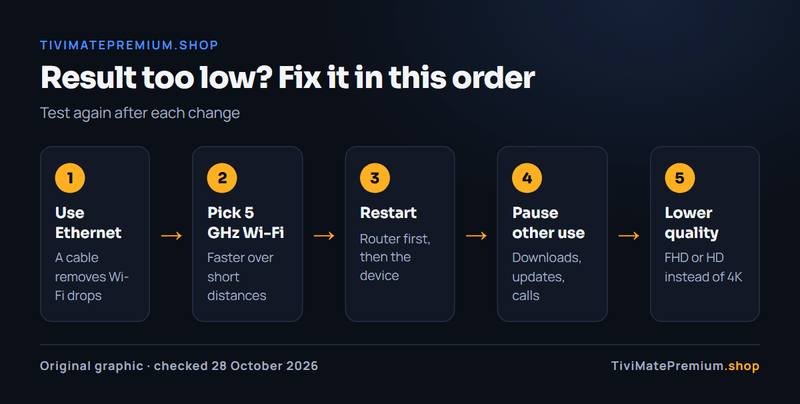
- Use Ethernet where you can. A cable removes Wi-Fi drops completely. The Fire TV Cube, NVIDIA SHIELD and Google TV Streamer have an Ethernet port; the Fire TV Stick 4K Max needs Amazon's adapter.
- Pick the 5 GHz Wi-Fi band. It is faster over short distances than 2.4 GHz. Keep the router in the same room as the TV if you can.
- Restart the router and the TV device. Unplug both for a minute, start the router first, then the device.
- Pause other heavy use. Large downloads, game updates and video calls on other devices share the same line.
- Lower the stream quality. If you still sit between bands, watch the FHD or HD version of a channel instead of 4K.
Our guide to fixing TiviMate buffering goes through each of these in detail, and the best TiviMate settings guide covers the device settings that help on Fire TV and Google TV. On a Google TV or Android TV box, the Android TV and Google TV setup guide walks through the whole setup on those boxes, and if you plan to watch several channels on one screen, TiviMate Multiview explains how the speed adds up.
Ready to watch? Your next two steps
If your result clears the band you want, the next step is setting up your device. Our IPTV setup guides for every device cover Fire TV, Android TV, Google TV, smart TVs, phones and computers, with the TiviMate on Firestick guide as the most common starting point.
Then choose how many screens you need. Every plan includes 4K, FHD and HD streams, is billed once with no auto-renew, and works in TiviMate and every major app. Compare the IPTV plans for TiviMate from $4.16/mo, or message us on WhatsApp with your result and we will tell you what fits.
IPTV speed test: questions
What internet speed do I need for IPTV?
About 5 Mbps per screen for SD, 10 Mbps for Full HD and 25 Mbps for 4K. Add the figures together for every screen that watches at the same time, and leave some room for other devices in the house.
Why is my result lower than the speed I pay for?
The advertised speed is measured at the router. Wi-Fi walls, distance, the 2.4 GHz band and other devices on the line all take a share before the stream reaches your TV. Ethernet or 5 GHz Wi-Fi usually closes most of the gap.
Does the IPTV speed test use my data allowance?
Yes, a little. Each run downloads the 10 MB file twice, so about 20 MB in total. That is about what 16 seconds of Full HD streaming at 10 Mbps uses. Nothing is uploaded and no other server is contacted, and the test runs only when you press Start.
Should I run the test on my phone or on the TV device?
On the TV device if it has a browser. If not, run it on a phone held where the TV device sits, connected to the same Wi-Fi network and band, at the time you normally watch. A laptop next to the router can show double the speed your TV device really gets.
Is 4K worth it on a 25 Mbps connection?
On one screen, yes, if nothing else heavy runs at the same time. If someone else watches or downloads at the same time, the Full HD version of the channel will play more smoothly. For a steadier 4K picture, plug in Ethernet or move the router closer.
Sources
Official pages we checked for the facts on this page, on 28 October 2026.
Fast enough? Pick your plan
Plans from $4.16/mo · Billed once, no auto-renew · 7-day money-back