
Best Firestick for TiviMate in 2026: which models still work
By TiviMatePremium.shop · Updated 28 October 2026
The best Firestick for TiviMate in 2026 is the Fire TV Stick 4K Max (2nd Gen, 2023): it runs Fire OS 8, so TiviMate installs through Downloader in minutes. Avoid the Fire TV Stick 4K Select, the Fire TV Stick 4K - 3rd Gen (2026) and the Fire TV Stick HD (2026). They run Vega OS and cannot install TiviMate at all.
In short
- Pick the Fire TV Stick 4K Max (2nd Gen): Fire OS 8, 2GB of memory, 16 GB of storage and Wi-Fi 6E.
- Three new Fire TV sticks run Vega OS and cannot install TiviMate: check the OS before you buy or set up.
- Want Ethernet built in or TiviMate from Google Play? A Fire TV Cube or a Google TV device fits better.
| Our pick | Fire TV Stick 4K Max (2nd Gen) |
|---|---|
| Built-in Ethernet | Fire TV Cube (3rd Gen) |
| Avoid | Vega OS models |
| How to check | Software version: Fire OS, or OS 1 or 2 |
| Setup guide | TiviMate on Firestick |
Short answer: the best Firestick for TiviMate
Buy the Fire TV Stick 4K Max (2nd Gen, 2023). It runs Fire OS 8, Amazon lists 2GB of memory, 16 GB of storage and Wi-Fi 6E, and TiviMate installs on it with Downloader code 272483. Before buying any other Fire TV stick, check that it runs Fire OS: three current models run Amazon's Vega OS and cannot install TiviMate.
Choosing the best Firestick for TiviMate used to be simple: any stick worked, and the faster ones just loaded the guide quicker. That changed when Amazon started shipping some Fire TV models on Vega OS, its new operating system, alongside Fire OS. TiviMate is an Android app, and our TiviMate on Firestick guide only works on Fire OS. This post shows which models still work, how to check the one you own, and when a Google TV device is the better buy.
Every spec below comes from Amazon's, Google's and NVIDIA's own spec pages. We list no prices, because they change by country and by week.
Fire OS or Vega OS: which Fire TV models install TiviMate
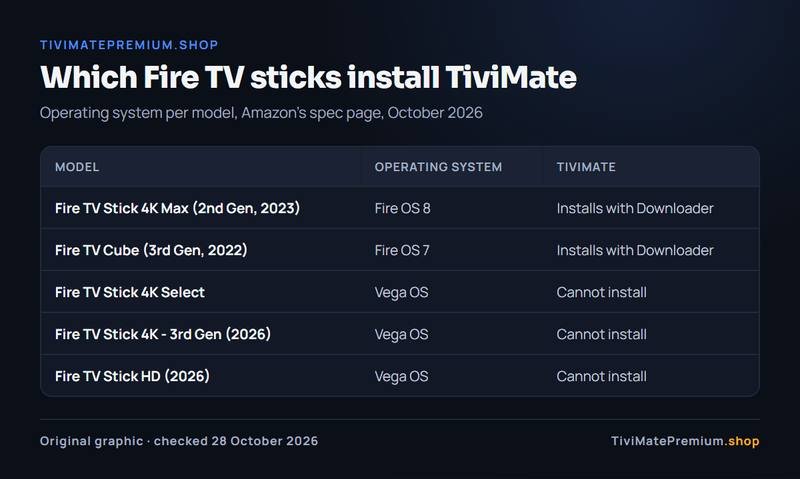
Amazon's Fire TV spec page lists an operating system for each model. Models on Fire OS can install TiviMate through Downloader. The three models below list a Vega OS version instead, and on them neither Downloader nor TiviMate can be installed, the same rule our Firestick guide follows. So the best Firestick for TiviMate is always a Fire OS model.
| Model | Operating system | TiviMate |
|---|---|---|
| Fire TV Stick 4K Max (2nd Gen, 2023) | Fire OS 8 | Installs with Downloader |
| Fire TV Stick 4K Plus (2025) | Fire OS 8 | Fire OS, not checked by us yet |
| Fire TV Cube (3rd Gen, 2022) | Fire OS 7 | Installs with Downloader |
| Fire TV Stick 4K Select | Vega OS | Cannot install |
| Fire TV Stick 4K - 3rd Gen (2026) | Vega OS | Cannot install |
| Fire TV Stick HD (2026) | Vega OS | Cannot install |
How to spot the Vega OS models: the Fire TV Stick 4K Select, the Fire TV Stick HD (2026) (Wi-Fi 6, rounded corners, "Fire TV" printed on the stick) and the Fire TV Stick 4K - 3rd Gen (2026) (white box, "4K" printed next to the HDMI plug). To check, open Settings › My Fire TV › About (on newer menus, Settings › Device › Fire TV) and read the software version: "Fire OS" means TiviMate installs; "OS" followed by a number starting with 1 or 2 means Vega OS.
Warning. Model names repeat across years. A "Fire TV Stick 4K" or "Fire TV Stick HD" bought in 2026 may be a Vega OS model even if the one you had before ran Fire OS. Check the software version, not the name on the box.
How to check which OS your Fire TV runs
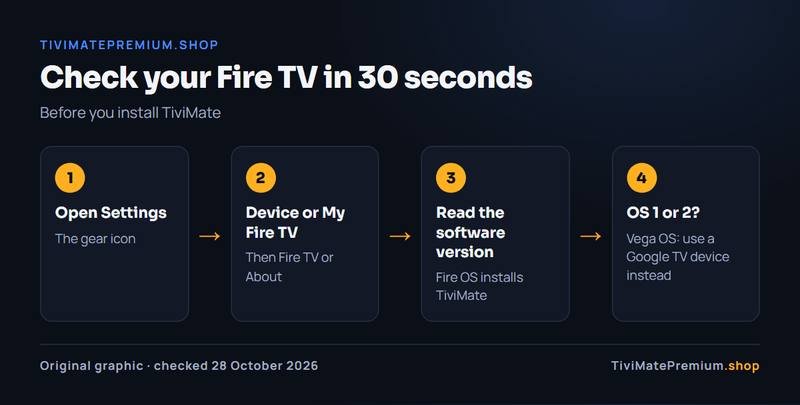
Before you choose the best Firestick for TiviMate from the devices you already own, check the OS. It takes 30 seconds and saves a wasted evening. Amazon's developer documentation gives the path on current menus as Settings › Device › Fire TV, where it shows the Software Version. On older menus the same screen is Settings › My Fire TV › About.
- Press the Home button and open Settings (the gear icon).
- Open Device, or My Fire TV on older menus, then the Fire TV or About screen.
- Read the software version. If it says Fire OS, TiviMate installs. If it shows OS followed by a version starting with 1 or 2, with no Fire in front, the device runs Vega OS.
On a Vega OS stick, return it if you can and pick one of the devices below, or message us on WhatsApp and we suggest a device before you order. Apps such as IPTV Smarters and IBO Player are covered in our IPTV setup guides for the devices they run on.
Our pick: Fire TV Stick 4K Max (2nd Gen, 2023)
Fire TV Stick 4K Max (2nd Gen, 2023) is the best Firestick for TiviMate in 2026: Fire OS 8, 16 GB for the app and its guide data, Wi-Fi 6E, and 4K with HDR10, HDR10+, HLG and Dolby Vision.
Storage matters more than it sounds. A large playlist with a full week of TV guide data takes space, and a stick that fills up starts to slow down. Amazon lists 16 GB on the 4K Max, against 8 GB on the 4K Plus, one reason the 4K Max is the best Firestick for TiviMate rather than the 4K Plus. Wi-Fi 6E only helps with a router that supports it; Amazon notes that a compatible Wi-Fi 6E router is required to benefit. On any router, the 5 GHz band near the router is still the most reliable wireless choice.
The 4K Max has no Ethernet port of its own. Amazon lists 10/100 Mbps Ethernet with an external adapter, which is plenty for one 4K stream at about 25 Mbps. If your TV is far from the router, the adapter is the best fix for buffering, as our TiviMate buffering fixes explain.
| Device | OS | Memory | Storage | Ethernet |
|---|---|---|---|---|
| Fire TV Stick 4K Max (2nd Gen, 2023) | Fire OS 8 | 2GB | 16 GB | 10/100 with an external adapter |
| Fire TV Stick 4K Plus (2025) | Fire OS 8 | 2GB | 8 GB | Not listed in our source |
| Fire TV Cube (3rd Gen, 2022) | Fire OS 7 | 2GB | 16 GB | Built-in 10/100 port |
| Google TV Streamer | Android TV OS | 4GB | 32GB | Built-in 1 Gbps port |
| NVIDIA SHIELD TV Pro | Android 11 (Android TV) | 3 GB | 16 GB | Built-in Gigabit |
Need Ethernet built in? Fire TV Cube (3rd Gen)
The Fire TV Cube (3rd Gen, 2022) is the Fire OS choice for a TV next to the router or with a cable run to it. Amazon lists a built-in 10/100 Ethernet port, 2GB of memory, 16 GB of storage and tri-band Wi-Fi, plus an HDMI input and a USB port. It runs Fire OS 7, so the same Downloader steps apply. If a wired connection matters more than size, the Cube is the best Firestick for TiviMate in your home, even though it is not a stick.
It sits next to the TV rather than behind it, so it suits a living room setup better than a bedroom one. For a second TV, the 4K Max is usually enough, and our IPTV plans for TiviMate cover two or three screens watching at the same time.
Fire TV Stick 4K Plus (2025): a Fire OS model we have not checked
Amazon lists the Fire TV Stick 4K Plus (2025) with Fire OS 8, 2GB of memory, 8 GB of storage and Wi-Fi 6. Because it runs Fire OS, the Downloader route should apply, but we have not checked TiviMate on it ourselves, so it is not our pick. If you already own one, check the OS first as shown above, then follow the Firestick setup steps.
With 8 GB of storage, keep only the apps you use and clear the TiviMate cache now and then. A smaller TV guide window also helps, and our TiviMate EPG guide explains how the guide loads.
When a Google TV or Android TV device beats any Firestick
TiviMate's Google Play listing says it is designed for Android TV and remote control navigation. On a Google TV or Android TV device you install it straight from Google Play, with no Downloader step, and Premium is bought and managed through Google Play there. That makes these devices the simpler choice if a Fire TV stick is not a must, and a fair rival to the best Firestick for TiviMate.
- Google TV Streamer: 4GB of memory, 32GB of storage and a built-in 1 Gbps Ethernet port, sold in the US, the UK, Canada, France and Germany according to Google.
- NVIDIA SHIELD TV Pro: 3 GB of memory, 16 GB of storage, Gigabit Ethernet and two USB 3.0 ports, the most room for large playlists.
- A Google TV television: TVs from Hisense, Philips, Sony and TCL run Google TV, so TiviMate installs from the Play Store on the TV itself.
Our best Android TV box for TiviMate post compares these in detail, and the Android TV and Google TV setup guide shows the install. On a Samsung or LG TV, which run their own systems, TiviMate is not available: see our smart TV setup guide for the apps that are.
Setting up TiviMate on the best Firestick for TiviMate
Once you have a Fire OS stick, the setup is a one-time job of about 10 minutes. These are the steps in short; our full TiviMate on Firestick guide has a picture for each one.
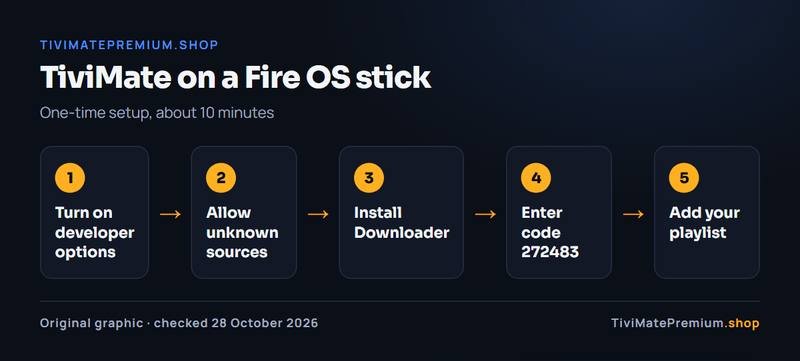
- Turn on developer options: Amazon's documentation says to click 7 times on Settings › My Fire TV › About › Your TV.
- In Developer Options, turn on Apps from Unknown Sources for Downloader.
- Install Downloader from the Amazon Appstore.
- In Downloader, enter code 272483 or tivimate.com/apk, the address tivimate.com gives, and install TiviMate.
- Add your playlist with the Xtream Codes or M3U details from our WhatsApp message, as our guide to adding a playlist in TiviMate shows.
TiviMate's free version plays one playlist with the TV guide. Premium is a separate purchase from the developer, never from us; our TiviMate free vs Premium page shows what it adds, and how to activate TiviMate Premium covers devices without Google Play, such as a Fire TV, through the Companion app.
Warning. Install TiviMate only from tivimate.com or Google Play. Modified "Premium" APKs are a security risk, as our page on the TiviMate Premium APK explains.
Match the stick to your TV and your internet
A 4K stick only pays off on a 4K television with a line fast enough for 4K. Our service streams in 4K, FHD and HD; a 4K channel needs about 25 Mbps per screen, Full HD about 10. Run our IPTV speed test on the TV where the stick will go before deciding between Wi-Fi and the Ethernet adapter.
So which is the best Firestick for TiviMate for you? On a 4K TV with good Wi-Fi, the 4K Max. With a cable to the router, the Fire TV Cube. If you would rather install from Google Play, a Google TV Streamer. Whichever you pick, our best TiviMate settings guide helps you tune it, and more device posts are on the TiviMate and IPTV blog.
Firestick and TiviMate: questions
Which Firestick is best for TiviMate in 2026?
The Fire TV Stick 4K Max (2nd Gen, 2023). It runs Fire OS 8, so TiviMate installs through Downloader, and Amazon lists 2GB of memory, 16 GB of storage and Wi-Fi 6E. For a built-in Ethernet port, the Fire TV Cube (3rd Gen) is the Fire OS alternative.
Does TiviMate work on the Fire TV Stick 4K Select?
No. The Fire TV Stick 4K Select, the Fire TV Stick HD (2026) and the Fire TV Stick 4K - 3rd Gen (2026) run Amazon's Vega OS, which cannot install Downloader, TiviMate or any other sideloaded app. If you already own a Fire TV, read its software version under Settings › My Fire TV › About before you install anything. Use a Fire OS model such as the Fire TV Stick 4K Max, or a Google TV device instead.
How do I know if my Fire TV runs Vega OS?
Open Settings › My Fire TV › About (on newer menus, Settings › Device › Fire TV) and read the software version: "Fire OS" means TiviMate installs; "OS" followed by a number starting with 1 or 2 means Vega OS. The check takes about 30 seconds, so do it before you install Downloader or set up a playlist on that device.
Is a Fire TV Stick or a Google TV Streamer better for TiviMate?
Both work. The Fire TV Stick 4K Max is smaller and installs TiviMate through Downloader. The Google TV Streamer installs it from Google Play and has 4GB of memory, 32GB of storage and a built-in 1 Gbps Ethernet port, which suits large playlists and 4K on a cable.
Do I need TiviMate Premium on a Firestick?
No. The free version plays one playlist with the TV guide. Premium is the developer's paid upgrade with extra features, bought only from the developer; on a Fire TV it is unlocked through the TiviMate Companion app. Our TiviMate Premium price page tracks what it costs.
Sources
Official pages we checked for the facts on this page, on 28 October 2026.
- Amazon Developer: Fire TV streaming media player specifications (models, OS, memory, storage, Wi-Fi, Ethernet)
- Amazon Developer: Fire TV Cube specifications
- Amazon Developer: Fire OS overview (where to find the software version)
- Amazon Developer: connect to a Fire TV with ADB (developer options, apps from unknown sources)
- TiviMate official site (Downloader code and tivimate.com/apk)
- TiviMate IPTV Player on Google Play
- TiviMate Companion on Google Play
- Google Store Help: Google TV Streamer technical specifications
- Google Store Help: countries where Google devices are sold
- NVIDIA: SHIELD TV Pro specifications
- Google TV: partner TV brands
- AFTVnews (not an official source): the Fire TVs that cannot sideload because of Vega OS, the basis of our Vega OS rule
Got your Fire TV Stick 4K Max? Add the channels.
Plans from $4.16/mo · Billed once, no auto-renew · 7-day money-back