
IPTV setup guides for every device
By TiviMatePremium.shop · Updated 28 October 2026
This IPTV setup guide works the same way on every device: pick your device, install a player app, then enter the login we send on WhatsApp. It takes about 5 to 10 minutes. The finder below shows the exact steps for your device and app, and each device also has its own full written guide.
In short
- On a Firestick, Fire TV or Android TV, install TiviMate and type in your Xtream Codes login.
- On Apple, Samsung, LG and computers, IBO Player is the easiest app, and we can activate it for you.
- Every IPTV setup guide here uses the Xtream Codes login and M3U link included with every plan, so any major player works.
| Device guides | 11, from Fire TV to Windows and Mac |
|---|---|
| Setup time | About 5 to 10 minutes |
| Login | Xtream Codes and an M3U link |
| Best app on Fire TV and Android | TiviMate |
| Help | Daily support, usually within the hour |
Up and running in three steps
Every IPTV setup guide on this site follows the same three steps. Only the app and the buttons change from one device to the next.
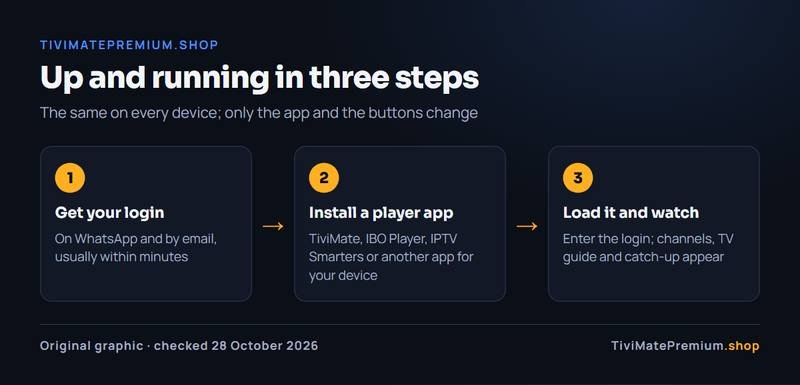
Get your login
Choose a plan. The Xtream Codes login and the M3U link arrive on WhatsApp and by email, usually within minutes.
Install a player app
TiviMate, IBO Player, IPTV Smarters or another app that runs on your device. Each guide names the best one first.
Load it and watch
Enter the login, wait a minute, and your channels, TV guide and catch-up appear.
Find your IPTV setup guide in three taps
Choose your device, then your app, and the finder shows only the steps you need, with a link to the full IPTV setup guide for that device.
Which device do you have?
Pick the screen you watch on. The next step shows the apps that run on it.
- Best for TiviMate Fire TV Fire Stick · Fire TV · Cube
- Android TV Google TV · SHIELD · boxes
- Android phone Android 5.0 and newer
- iPhone and iPad iOS · iPadOS
- Apple TV tvOS
- Samsung Tizen
- LG webOS
- Roku Stick · Express · Roku TV
- MAG All MAG models
- STB Emu Android · Android TV · Fire TV
- Formuler Z and S series
- Windows and Mac PC · laptop
Choose your app for Fire TV
Fire TV models on Amazon's Vega OS cannot install these apps: the Fire TV Stick 4K Select, the Fire TV Stick HD (2026) (Wi-Fi 6, rounded corners, "Fire TV" printed on the stick) and the Fire TV Stick 4K - 3rd Gen (2026) (white box, "4K" printed next to the HDMI plug). To check, open Settings › My Fire TV › About (on newer menus, Settings › Device › Fire TV) and read the software version: "Fire OS" means TiviMate installs; "OS" followed by a number starting with 1 or 2 means Vega OS. How to check your model
These player apps are made by independent developers, not by us. Any app fee is paid once to the app's developer, separate from your TiviMatePremium.shop plan.
Free app. Premium is optional: $9.99 a year or $33.99 lifetime on US Google Play (October 2026), up to 5 devices, paid to its developer.
You type it inFree for 7 days, then a yearly or lifetime licence per device, paid to its developer.
We activate itFree for 14 days, then a one-time fee per device, paid to its developer.
We activate itFree. Listed as Smarters Player Lite on Apple devices.
You type it inChoose your app for Android TV
These player apps are made by independent developers, not by us. Any app fee is paid once to the app's developer, separate from your TiviMatePremium.shop plan.
Free app. Premium is optional: $9.99 a year or $33.99 lifetime on US Google Play (October 2026), up to 5 devices, paid to its developer.
You type it inFree for 7 days, then a yearly or lifetime licence per device, paid to its developer.
We activate itFree for 14 days, then a one-time fee per device, paid to its developer.
We activate itFree. Listed as Smarters Player Lite on Apple devices.
You type it inChoose your app for Android phone
These player apps are made by independent developers, not by us. Any app fee is paid once to the app's developer, separate from your TiviMatePremium.shop plan.
Free app. Premium is optional: $9.99 a year or $33.99 lifetime on US Google Play (October 2026), up to 5 devices, paid to its developer.
You type it inFree for 7 days, then a yearly or lifetime licence per device, paid to its developer.
We activate itFree for 14 days, then a one-time fee per device, paid to its developer.
We activate itFree. Listed as Smarters Player Lite on Apple devices.
You type it inChoose your app for iPhone and iPad
These player apps are made by independent developers, not by us. Any app fee is paid once to the app's developer, separate from your TiviMatePremium.shop plan.
Free for 7 days, then a yearly or lifetime licence per device, paid to its developer.
We activate itFree for 14 days, then a one-time fee per device, paid to its developer.
We activate itFree. Listed as Smarters Player Lite on Apple devices.
You type it inFree, with an optional Pro plan paid to its developer.
You type it inChoose your app for Apple TV
These player apps are made by independent developers, not by us. Any app fee is paid once to the app's developer, separate from your TiviMatePremium.shop plan.
Free for 7 days, then a yearly or lifetime licence per device, paid to its developer.
We activate itFree for 14 days, then a one-time fee per device, paid to its developer.
We activate itFree. Listed as Smarters Player Lite on Apple devices.
You type it inFree, with an optional Pro plan paid to its developer.
You type it inChoose your app for Samsung
These player apps are made by independent developers, not by us. Any app fee is paid once to the app's developer, separate from your TiviMatePremium.shop plan.
Free for 7 days, then a yearly or lifetime licence per device, paid to its developer.
We activate itFree for 14 days, then a one-time fee per device, paid to its developer.
We activate itActivation goes through us, from the MAC address your TV shows.
We activate itChoose your app for LG
These player apps are made by independent developers, not by us. Any app fee is paid once to the app's developer, separate from your TiviMatePremium.shop plan.
Free for 7 days, then a yearly or lifetime licence per device, paid to its developer.
We activate itFree for 14 days, then a one-time fee per device, paid to its developer.
We activate itActivation goes through us, from the MAC address your TV shows.
We activate itChoose your app for Roku
These player apps are made by independent developers, not by us. Any app fee is paid once to the app's developer, separate from your TiviMatePremium.shop plan.
Phone app plus a free Roku receiver. Check the store listing for current pricing.
You paste the M3U linkBuilt into iPhone and Roku 4K models.
You mirror your phoneAvailability and pricing change often, so check the Roku Channel Store.
You type it inChoose your app for MAG
These player apps are made by independent developers, not by us. Any app fee is paid once to the app's developer, separate from your TiviMatePremium.shop plan.
Part of every MAG box.
We register your MACChoose your app for STB Emu
These player apps are made by independent developers, not by us. Any app fee is paid once to the app's developer, separate from your TiviMatePremium.shop plan.
Free, or the paid ad-free Pro version.
We send the portalChoose your app for Formuler
These player apps are made by independent developers, not by us. Any app fee is paid once to the app's developer, separate from your TiviMatePremium.shop plan.
Built into Formuler boxes.
You type it inFree app. Premium is optional: $9.99 a year or $33.99 lifetime on US Google Play (October 2026), up to 5 devices, paid to its developer.
You type it inUses the MAC address printed on the box.
We register your MACChoose your app for Windows and Mac
These player apps are made by independent developers, not by us. Any app fee is paid once to the app's developer, separate from your TiviMatePremium.shop plan.
Free for 7 days, then a yearly or lifetime licence per device, paid to its developer.
We activate itFree. Listed as Smarters Player Lite on Apple devices.
You type it inFree.
You paste the M3U linkSetup: TiviMate on Fire TV
About 10 min · Easy
-
Install Downloader
Search for Downloader (orange icon) in the Amazon Appstore on your Fire TV and install it. The app is free.
-
Unlock Developer Options (one time)
Open Settings, My Fire TV, About. Select your Fire TV name at the top and press the centre button seven times in a row, until a message says Developer Options is on. Return to My Fire TV, open Developer options and switch on Apps from Unknown Sources. On newer Fire OS the setting is called Install unknown apps, and Downloader must be set to ON.
▶ Watch: how to unlock Developer Options on a Firestick (1 min) · Video by AFTVnews -
Install TiviMate from the official address
Open Downloader, type the code below (or tivimate.com/download), select Go and install the app.
272483 Opens the official TiviMate download from files.tivimate.comPrefer to type an address? Use tivimate.com/download instead.
-
Add your playlist
Open TiviMate and choose Add playlist, then Xtream Codes. Enter the server URL, username and password from WhatsApp, select Next, name the playlist and finish with Done.
-
Check the guide
Wait for the channels and guide to load, then open any channel. The free version covers this. Premium adds recording and multi-view.
You're all set
Channels not showing yet? Wait 1 to 2 minutes, then close and reopen the app.
Setup: IBO Player on Fire TV
About 10 min · Easy
-
Install Downloader
Search for Downloader (orange icon) in the Amazon Appstore on your Fire TV and install it. The app is free.
-
Unlock Developer Options (one time)
Open Settings, My Fire TV, About. Select your Fire TV name at the top and press the centre button seven times in a row, until a message says Developer Options is on. Return to My Fire TV, open Developer options and switch on Apps from Unknown Sources. On newer Fire OS the setting is called Install unknown apps, and Downloader must be set to ON.
▶ Watch: how to unlock Developer Options on a Firestick (1 min) · Video by AFTVnews -
Install IBO Player
Open Downloader, type the code below and install the app.
511693 Opens the official IBO Player download from iboplayer.com -
Note the Device ID and Key
Open IBO Player. The screen shows Device ID and Key. Take a photo or screenshot of it, because you will send it to us.
-
Send it to us on WhatsApp
Message us with the screenshot and say which app it came from. We link the details to your plan and tell you when it is ready, usually within minutes.
-
Reopen and watch
Close IBO Player completely, open it again and your channels appear. If the list is still empty, wait a minute and restart the app.
You're all set
Channels not showing yet? Wait 1 to 2 minutes, then close and reopen the app.
Setup: ELK Player on Fire TV
About 10 min · Easy
-
Install Downloader
Search for Downloader (orange icon) in the Amazon Appstore on your Fire TV and install it. The app is free.
-
Unlock Developer Options (one time)
Open Settings, My Fire TV, About. Select your Fire TV name at the top and press the centre button seven times in a row, until a message says Developer Options is on. Return to My Fire TV, open Developer options and switch on Apps from Unknown Sources. On newer Fire OS the setting is called Install unknown apps, and Downloader must be set to ON.
▶ Watch: how to unlock Developer Options on a Firestick (1 min) · Video by AFTVnews -
Install ELK Player
Open Downloader, type the code below and install the app.
82854 Opens the official ELK Player download from elkplayer.com -
Note the Device ID or MAC and Key
Open ELK Player. The screen shows Device ID or MAC and Key. Take a photo or screenshot of it, because you will send it to us.
-
Send it to us on WhatsApp
Message us with the screenshot and say which app it came from. We link the details to your plan and tell you when it is ready, usually within minutes.
-
Reopen and watch
Close ELK Player completely, open it again and your channels appear. If the list is still empty, wait a minute and restart the app.
You're all set
Channels not showing yet? Wait 1 to 2 minutes, then close and reopen the app.
Setup: IPTV Smarters on Fire TV
About 10 min · Easy
-
Install Downloader
Search for Downloader (orange icon) in the Amazon Appstore on your Fire TV and install it. The app is free.
-
Unlock Developer Options (one time)
Open Settings, My Fire TV, About. Select your Fire TV name at the top and press the centre button seven times in a row, until a message says Developer Options is on. Return to My Fire TV, open Developer options and switch on Apps from Unknown Sources. On newer Fire OS the setting is called Install unknown apps, and Downloader must be set to ON.
▶ Watch: how to unlock Developer Options on a Firestick (1 min) · Video by AFTVnews -
Install IPTV Smarters
Open Downloader, type the code below and install the app.
getiptvsmarters.com/files/android/iptv-smarters-5.0.apk Opens the official IPTV Smarters download from getiptvsmarters.com -
Log in with Xtream Codes
Open IPTV Smarters, choose Login with Xtream Codes API, enter the server URL, username and password from us, and select Add user.
You're all set
Channels not showing yet? Wait 1 to 2 minutes, then close and reopen the app.
Setup: TiviMate on Android TV
About 5 min · Easy
-
Find TiviMate
On Google TV and most Android TV devices, open Google Play and search for TiviMate. If your box has no store, install Downloader and use the code below instead.
272483 Opens the official TiviMate download from files.tivimate.comPrefer to type an address? Use tivimate.com/download instead.
-
Install and open it
Select Install, then Open when it finishes. Allow the permissions it asks for.
-
Add your playlist
Choose Add playlist, then Xtream Codes (or M3U if you prefer a link). Enter the login from our WhatsApp message and save.
-
Let the guide load
Give the channel list and guide a minute. The free version works fully, and Premium is optional.
You're all set
Channels not showing yet? Wait 1 to 2 minutes, then close and reopen the app.
Setup: IBO Player on Android TV
About 5 min · Easy
-
Install Downloader
Install the free Downloader app from your store. On a box without a store, sideload it from the maker's site.
-
Enter the verified IBO code
Open Downloader, type the code below and install the app.
511693 Opens the official IBO Player download from iboplayer.com -
Note the Device ID and Key
Open IBO Player. The screen shows Device ID and Key. Take a photo or screenshot of it, because you will send it to us.
-
Send it to us on WhatsApp
Message us with the screenshot and say which app it came from. We link the details to your plan and tell you when it is ready, usually within minutes.
-
Reopen and watch
Close IBO Player completely, open it again and your channels appear. If the list is still empty, wait a minute and restart the app.
You're all set
Channels not showing yet? Wait 1 to 2 minutes, then close and reopen the app.
Setup: ELK Player on Android TV
About 5 min · Easy
-
Install ELK Player from Google Play
Open Google Play on your Android TV, search for ELK Player and install it.
-
Note the Device ID and Key
Open ELK Player. The screen shows Device ID and Key. Take a photo or screenshot of it, because you will send it to us.
-
Send it to us on WhatsApp
Message us with the screenshot and say which app it came from. We link the details to your plan and tell you when it is ready, usually within minutes.
-
Reopen and watch
Close ELK Player completely, open it again and your channels appear. If the list is still empty, wait a minute and restart the app.
You're all set
Channels not showing yet? Wait 1 to 2 minutes, then close and reopen the app.
Setup: IPTV Smarters on Android TV
About 5 min · Easy
-
Install IPTV Smarters
Use Google Play if the app is listed there, or open Downloader and type the code below.
getiptvsmarters.com/files/android/iptv-smarters-5.0.apk Opens the official IPTV Smarters download from getiptvsmarters.com -
Log in with Xtream Codes
Choose Login with Xtream Codes API, then enter the server URL, username and password and select Add user.
You're all set
Channels not showing yet? Wait 1 to 2 minutes, then close and reopen the app.
Setup: TiviMate on Android phone
About 5 min · Easy
-
Install TiviMate from Google Play
Open the Play Store on your phone or tablet, search for TiviMate and install it. It is built for TV screens, so on a phone IPTV Smarters is often easier.
-
Add a playlist
Open the app, choose Add playlist, then Xtream Codes or M3U, and enter the details from our WhatsApp message.
-
Save and watch
Save the playlist. The channels and guide load in a minute.
You're all set
Channels not showing yet? Wait 1 to 2 minutes, then close and reopen the app.
Setup: IBO Player on Android phone
About 5 min · Easy
-
Install IBO Player
Install IBO Player from Google Play if it is listed for your phone or tablet, or get the Android APK from the developer's downloads page. Several apps use similar names, so pick the one whose listing points to iboplayer.com.
-
Note the Device ID and Key
Open IBO Player. The screen shows Device ID and Key. Take a photo or screenshot of it, because you will send it to us.
-
Send it to us on WhatsApp
Message us with the screenshot and say which app it came from. We link the details to your plan and tell you when it is ready, usually within minutes.
-
Reopen and watch
Close IBO Player completely, open it again and your channels appear. If the list is still empty, wait a minute and restart the app.
You're all set
Channels not showing yet? Wait 1 to 2 minutes, then close and reopen the app.
Setup: ELK Player on Android phone
About 5 min · Easy
-
Install ELK Player
Open Google Play, search for ELK Player and install it.
-
Note the Device ID and Key
Open ELK Player. The screen shows Device ID and Key. Take a photo or screenshot of it, because you will send it to us.
-
Send it to us on WhatsApp
Message us with the screenshot and say which app it came from. We link the details to your plan and tell you when it is ready, usually within minutes.
-
Reopen and watch
Close ELK Player completely, open it again and your channels appear. If the list is still empty, wait a minute and restart the app.
You're all set
Channels not showing yet? Wait 1 to 2 minutes, then close and reopen the app.
Setup: IPTV Smarters on Android phone
About 5 min · Easy
-
Download the official APK
Open the link below in your phone browser to download the official IPTV Smarters file, then open it to install. If Android asks, allow your browser to install apps for this one install.
-
Log in with Xtream Codes
Choose Login with Xtream Codes API, enter the server URL, username and password from us and select Add user.
You're all set
Channels not showing yet? Wait 1 to 2 minutes, then close and reopen the app.
Setup: IBO Player on iPhone and iPad
About 5 min · Easy
-
Install IBO Player
Open the App Store listing below on your iPhone or iPad, where it appears as IBO PLAYER, and install it. The licence is bought as an in-app purchase. Install only the listing linked here; look-alike IPTV apps exist on the App Store.
-
Note the Device ID and Key
Open IBO Player. The screen shows Device ID and Key. Take a photo or screenshot of it, because you will send it to us.
-
Send it to us on WhatsApp
Message us with the screenshot and say which app it came from. We link the details to your plan and tell you when it is ready, usually within minutes.
-
Reopen and watch
Close IBO Player completely, open it again and your channels appear. If the list is still empty, wait a minute and restart the app.
You're all set
Channels not showing yet? Wait 1 to 2 minutes, then close and reopen the app.
Setup: ELK Player on iPhone and iPad
About 5 min · Easy
-
Install ELK Player
Open the App Store on your iPhone or iPad, search for ELK Player and install it.
-
Note the Device ID and Key
Open ELK Player. The screen shows Device ID and Key. Take a photo or screenshot of it, because you will send it to us.
-
Send it to us on WhatsApp
Message us with the screenshot and say which app it came from. We link the details to your plan and tell you when it is ready, usually within minutes.
-
Reopen and watch
Close ELK Player completely, open it again and your channels appear. If the list is still empty, wait a minute and restart the app.
You're all set
Channels not showing yet? Wait 1 to 2 minutes, then close and reopen the app.
Setup: IPTV Smarters on iPhone and iPad
About 5 min · Easy
-
Install Smarters Player Lite
Open the App Store link below on your iPhone or iPad, or search for Smarters Player Lite.
-
Log in with Xtream Codes
Choose Login with Xtream Codes API and enter the server URL, username and password we sent.
You're all set
Channels not showing yet? Wait 1 to 2 minutes, then close and reopen the app.
Setup: UHF on iPhone and iPad
About 5 min · Easy
-
Add your playlist
Open UHF, add a playlist, choose Xtream Codes or M3U, enter the login we sent and save.
-
Watch
UHF is free, with an optional Pro plan paid to its developer.
You're all set
Channels not showing yet? Wait 1 to 2 minutes, then close and reopen the app.
Setup: IBO Player on Apple TV
About 5 min · Easy
-
Install IBO Player
Open the App Store on your Apple TV, search for IBO PLAYER and install the listing linked below. The licence is bought as an in-app purchase. Install only the listing linked here; look-alike IPTV apps exist on the App Store.
-
Note the Device ID and Key
Open IBO Player. The screen shows Device ID and Key. Take a photo or screenshot of it, because you will send it to us.
-
Send it to us on WhatsApp
Message us with the screenshot and say which app it came from. We link the details to your plan and tell you when it is ready, usually within minutes.
-
Reopen and watch
Close IBO Player completely, open it again and your channels appear. If the list is still empty, wait a minute and restart the app.
You're all set
Channels not showing yet? Wait 1 to 2 minutes, then close and reopen the app.
Setup: ELK Player on Apple TV
About 5 min · Easy
-
Install ELK Player
Open the App Store on your Apple TV, search for ELK Player and install it.
-
Note the Device ID and Key
Open ELK Player. The screen shows Device ID and Key. Take a photo or screenshot of it, because you will send it to us.
-
Send it to us on WhatsApp
Message us with the screenshot and say which app it came from. We link the details to your plan and tell you when it is ready, usually within minutes.
-
Reopen and watch
Close ELK Player completely, open it again and your channels appear. If the list is still empty, wait a minute and restart the app.
You're all set
Channels not showing yet? Wait 1 to 2 minutes, then close and reopen the app.
Setup: IPTV Smarters on Apple TV
About 5 min · Easy
-
Install Smarters Player Lite
Open the App Store link below on your Apple TV, or search for Smarters Player Lite.
-
Log in with Xtream Codes
Choose Login with Xtream Codes API and enter the server URL, username and password we sent.
You're all set
Channels not showing yet? Wait 1 to 2 minutes, then close and reopen the app.
Setup: UHF on Apple TV
About 5 min · Easy
-
Add your playlist
Open UHF, add a playlist, choose Xtream Codes or M3U, enter the login we sent and save.
-
Watch
UHF is free, with an optional Pro plan paid to its developer.
You're all set
Channels not showing yet? Wait 1 to 2 minutes, then close and reopen the app.
Setup: IBO Player on Samsung
About 5 min · Easy
-
Open the Samsung App Store
Press Home on the remote and open Apps. Use the search icon in the top right corner.
-
Install IBO Player
Search for IBO Player and install it, then open it. Several apps use similar names, so pick the one whose listing points to iboplayer.com.
-
Note the MAC address or Device ID and Key
Open IBO Player. The screen shows MAC address or Device ID and Key. Take a photo or screenshot of it, because you will send it to us.
-
Send it to us on WhatsApp
Message us with the screenshot and say which app it came from. We link the details to your plan and tell you when it is ready, usually within minutes.
-
Reopen and watch
Close IBO Player completely, open it again and your channels appear. Restart the app once more if the list is empty.
You're all set
Channels not showing yet? Wait 1 to 2 minutes, then close and reopen the app.
Setup: ELK Player on Samsung
About 5 min · Easy
-
Open the Samsung App Store
Press Home on the remote and open Apps. Use the search icon in the top right corner.
-
Install ELK Player
Search for ELK Player and install it, then open it.
-
Note the MAC address or Device ID and Key
Open ELK Player. The screen shows MAC address or Device ID and Key. Take a photo or screenshot of it, because you will send it to us.
-
Send it to us on WhatsApp
Message us with the screenshot and say which app it came from. We link the details to your plan and tell you when it is ready, usually within minutes.
-
Reopen and watch
Close ELK Player completely, open it again and your channels appear. If the list is still empty, wait a minute and restart the app.
You're all set
Channels not showing yet? Wait 1 to 2 minutes, then close and reopen the app.
Setup: Set IPTV on Samsung
About 5 min · Easy
-
Open the Samsung App Store
Press Home on the remote and open Apps. Use the search icon in the top right corner.
-
Install Set IPTV
Search for Set IPTV, install it and open it.
-
Note the MAC address
Open Set IPTV. The screen shows MAC address. Take a photo or screenshot of it, because you will send it to us.
-
Send it to us on WhatsApp
Message us with the screenshot and say which app it came from. We link the details to your plan and tell you when it is ready, usually within minutes.
-
Reopen and watch
Close Set IPTV completely, open it again and your channels appear. If the list is still empty, wait a minute and restart the app.
You're all set
Channels not showing yet? Wait 1 to 2 minutes, then close and reopen the app.
Setup: IBO Player on LG
About 5 min · Easy
-
Open the LG Content Store
Press Home, open the LG Content Store and use the search field at the top.
-
Install IBO Player
Search for IBO Player and install it, then open it. Several apps use similar names, so pick the one whose listing points to iboplayer.com.
-
Note the MAC address or Device ID and Key
Open IBO Player. The screen shows MAC address or Device ID and Key. Take a photo or screenshot of it, because you will send it to us.
-
Send it to us on WhatsApp
Message us with the screenshot and say which app it came from. We link the details to your plan and tell you when it is ready, usually within minutes.
-
Reopen and watch
Close IBO Player completely, open it again and your channels appear. Restart the app once more if the list is empty.
You're all set
Channels not showing yet? Wait 1 to 2 minutes, then close and reopen the app.
Setup: ELK Player on LG
About 5 min · Easy
-
Open the LG Content Store
Press Home, open the LG Content Store and use the search field at the top.
-
Install ELK Player
Search for ELK Player and install it, then open it.
-
Note the MAC address or Device ID and Key
Open ELK Player. The screen shows MAC address or Device ID and Key. Take a photo or screenshot of it, because you will send it to us.
-
Send it to us on WhatsApp
Message us with the screenshot and say which app it came from. We link the details to your plan and tell you when it is ready, usually within minutes.
-
Reopen and watch
Close ELK Player completely, open it again and your channels appear. If the list is still empty, wait a minute and restart the app.
You're all set
Channels not showing yet? Wait 1 to 2 minutes, then close and reopen the app.
Setup: Set IPTV on LG
About 5 min · Easy
-
Open the LG Content Store
Press Home, open the LG Content Store and use the search field at the top.
-
Install Set IPTV
Search for Set IPTV, install it and open it.
-
Note the MAC address
Open Set IPTV. The screen shows MAC address. Take a photo or screenshot of it, because you will send it to us.
-
Send it to us on WhatsApp
Message us with the screenshot and say which app it came from. We link the details to your plan and tell you when it is ready, usually within minutes.
-
Reopen and watch
Close Set IPTV completely, open it again and your channels appear. If the list is still empty, wait a minute and restart the app.
You're all set
Channels not showing yet? Wait 1 to 2 minutes, then close and reopen the app.
Setup: Web Video Caster on Roku
About 5 min · Easy
-
Install Web Video Caster on your phone
Download Web Video Caster from your phone's app store.
-
Add the receiver to your Roku
On the Roku, open the Channel Store and add Web Video Caster Receiver.
-
Add your playlist
In the phone app, open the menu, choose IPTV, then Add playlist, and paste the M3U link we send.
-
Cast
Select the cast button, choose your Roku and press play. Keep the phone app open while you watch.
You're all set
Channels not showing yet? Wait 1 to 2 minutes, then close and reopen the app.
Setup: AirPlay from iPhone on Roku
About 5 min · Easy
-
Check your model
AirPlay works on Roku 4K models. Make sure the iPhone and the Roku are on the same Wi-Fi.
-
Start playback on the iPhone
Open an IPTV app on the iPhone (see the iPhone guide) and play a channel.
-
Mirror to the Roku
Open Control Center, choose Screen Mirroring and select your Roku.
You're all set
Channels not showing yet? Wait 1 to 2 minutes, then close and reopen the app.
Setup: Channel Store player on Roku
About 5 min · Easy
-
Search the Channel Store
Open the Roku Channel Store and search for an M3U or IPTV player. Availability changes often.
-
Add the login
Open the player and add the M3U link or the Xtream Codes login we sent.
-
Watch
Wait for the list to load and open a channel.
You're all set
Channels not showing yet? Wait 1 to 2 minutes, then close and reopen the app.
Setup: MAG built-in portal on MAG
About 5 min · Easy
-
Find the MAC address
On the box open Settings, System Settings and look for the MAC address. It is also on the label under the box, in the form 00:1A:79:xx:xx:xx.
-
Receive your portal URL
We register the box and send a portal URL that looks like http://portal.example.com/c.
-
Enter the portal
Go to System Settings, Servers, Portals. Type a portal name and the URL we sent.
-
Save and reboot
Save the settings and reboot the box. Your channels load on start.
You're all set
Channels not showing yet? Wait 1 to 2 minutes, then close and reopen the app.
Setup: STB Emulator / STBEmu Pro on STB Emu
About 5 min · Easy
-
Install the app
Install STB Emulator from Google Play, or sideload it on Fire TV.
-
Add a profile
Open Settings, Profiles, Add profile and give it any name.
-
Note the MAC address
Open STB Configuration and write down the MAC address.
-
Paste the portal URL
We send your portal URL. Open the profile, choose Portal settings and paste it.
-
Save and reload
Save, go back and select Reload portal.
You're all set
Channels not showing yet? Wait 1 to 2 minutes, then close and reopen the app.
Setup: MyTVOnline 3 on Formuler
About 5 min · Easy
-
Open MyTVOnline
Start MyTVOnline from the Formuler home screen.
-
Add a portal
Go to Settings, Portal Settings, Add Portal and enter any name.
-
Choose Xtream Codes API
Set the login type to Xtream Codes API, then enter the server URL, username and password we sent.
-
Save and connect
Save, then select the portal to connect. Your channels load.
You're all set
Channels not showing yet? Wait 1 to 2 minutes, then close and reopen the app.
Setup: TiviMate on Formuler
About 5 min · Easy
-
Install TiviMate from Google Play
Formuler runs Android, so open Google Play, search for TiviMate and install it.
-
Add the Xtream Codes playlist
Choose Add playlist, then Xtream Codes, and enter the server URL, username and password.
-
Watch
Let the guide load and open a channel.
You're all set
Channels not showing yet? Wait 1 to 2 minutes, then close and reopen the app.
Setup: MAC portal on Formuler
About 5 min · Easy
-
Find the MAC address
Open Settings, About and note the MAC address.
-
Use the portal we send
We register the MAC and send the portal details. Enter them in Portal Settings.
You're all set
Channels not showing yet? Wait 1 to 2 minutes, then close and reopen the app.
Setup: IBO Player on Windows and Mac
About 5 min · Easy
-
Download IBO Player
Download the Windows or Mac version from the official page and install it.
-
Note the Device ID and Key
Open IBO Player. The screen shows Device ID and Key. Take a photo or screenshot of it, because you will send it to us.
-
Send it to us on WhatsApp
Message us with the screenshot and say which app it came from. We link the details to your plan and tell you when it is ready, usually within minutes.
-
Reopen and watch
Close IBO Player completely, open it again and your channels appear. If the list is still empty, wait a minute and restart the app.
You're all set
Channels not showing yet? Wait 1 to 2 minutes, then close and reopen the app.
Setup: IPTV Smarters on Windows and Mac
About 5 min · Easy
-
Download IPTV Smarters
Download the official Windows or Mac installer and run it.
-
Log in with Xtream Codes
Choose Login with Xtream Codes API, enter the server URL, username and password and select Add user.
You're all set
Channels not showing yet? Wait 1 to 2 minutes, then close and reopen the app.
Setup: VLC on Windows and Mac
About 5 min · Easy
-
Copy your M3U link
Copy the M3U link from our WhatsApp message.
-
Open the network stream
In VLC choose Media, Open Network Stream, paste the link and press Play. VLC has no TV guide.
You're all set
Channels not showing yet? Wait 1 to 2 minutes, then close and reopen the app.
Every IPTV setup guide by device
The finder is the quick route. Each device below also has a full IPTV setup guide with every supported app, the common errors and how to fix them.
- How to install TiviMate on Firestick Two one-time steps come first: install Downloader, then allow it to install apps from Developer Options.
- TiviMate on Android TV, Google TV and SHIELD Google TV and most Android TV devices install TiviMate straight from Google Play.
- IPTV on Android Phone and Tablet: Setup Guide TiviMate, IBO Player and ELK Player install from Google Play; IPTV Smarters comes from its official APK.
- IPTV on iPhone and iPad: Apps and Setup TiviMate does not run on iOS or iPadOS, but four good players accept the same login.
- IPTV on Apple TV: Apps and Step-by-Step Setup tvOS has no TiviMate, but four good players accept the same login.
- IPTV on Samsung and LG smart TVs IPTV on Samsung and LG needs a player from the TV's own store; sideloading cannot work.
- IPTV on Roku: 3 methods that work Casting from your phone with Web Video Caster is the most reliable route.
- MAG box IPTV setup The box connects with a portal, not a login: its MAC address ties it to your plan.
- STB Emu IPTV setup The app copies a MAG box portal inside Android: a MAC address and a portal URL, no username.
- Formuler IPTV setup: MyTVOnline 3, TiviMate or MAC portal MyTVOnline 3 is built in: add a portal with your Xtream Codes login and you are done.
- IPTV on Windows and Mac: Apps and Setup IBO Player and IPTV Smarters have official downloads for both Windows and macOS.
How to install TiviMate on any device
TiviMate is an Android app, so how you install it depends on what your device runs. On a Firestick or another Fire TV that runs Fire OS, there is no Google Play, so you add the free Downloader app, unlock Developer Options and enter the verified code 272483. It opens the official file from files.tivimate.com, nothing else. Our Firestick setup guide with TiviMate walks through every screen, including a short video for the Developer Options step.
On Android TV, Google TV and NVIDIA SHIELD, TiviMate is in Google Play, so you search, install and open it. Android boxes without a store use the same Downloader code. Android phones and tablets install it from Google Play too, and Formuler boxes run Android, so the store route works there as well. The Android TV, Google TV and SHIELD guide covers all of these.
Apple TV, iPhone, iPad, Samsung and LG TVs, Roku and computers cannot run TiviMate at all. For those, each IPTV setup guide names the best alternative and shows its steps, so you never follow instructions that cannot work on your hardware. Once the app is installed, add your playlist in TiviMate with the Xtream Codes login and give the guide a minute to load.
| Device | How to install TiviMate | Full guide |
|---|---|---|
| Fire TV Stick 4K Max, Fire TV Cube and other Fire OS models | Downloader app, code 272483 (or tivimate.com/download) | Fire TV guide |
| Android TV, Google TV, NVIDIA SHIELD | Google Play | Android TV guide |
| Android box with no store | Downloader app, code 272483 | Android box section |
| Android phone and tablet | Google Play | Android phone guide |
| Formuler Z and S series | Google Play, or MyTVOnline 3 built in | Formuler guide |
| Apple, Samsung, LG, Roku, computers | Not available: use IBO Player or IPTV Smarters | Smart TV guide |
Warning. Fire TV models on Amazon's Vega OS cannot install Downloader or TiviMate: the Fire TV Stick 4K Select, the Fire TV Stick HD (2026) (Wi-Fi 6, rounded corners, "Fire TV" printed on the stick) and the Fire TV Stick 4K - 3rd Gen (2026) (white box, "4K" printed next to the HDMI plug). To check, open Settings › My Fire TV › About (on newer menus, Settings › Device › Fire TV) and read the software version: "Fire OS" means TiviMate installs; "OS" followed by a number starting with 1 or 2 means Vega OS. Check your Fire TV model before you start.
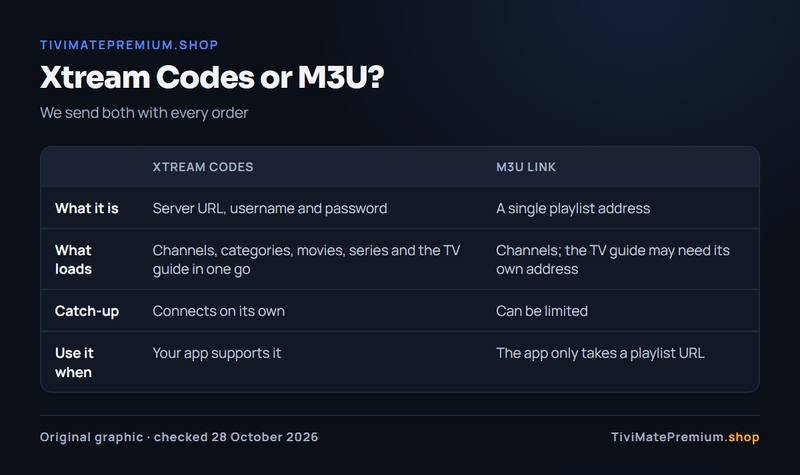
Xtream Codes or M3U: which login to use
Every plan comes with two kinds of login, and most players accept either. The Xtream Codes login has three parts: a server URL, a username and a password. A player that supports it loads your channels, categories, movies, series and the TV guide in one go, and catch-up connects on its own. That is why each IPTV setup guide here recommends it first.
The M3U link is a single playlist address. It suits players that do not accept Xtream Codes, such as VLC or a casting app on Roku, but the TV guide may need its own address and catch-up can be limited. If your app offers both, choose Xtream Codes. If it only has a field for a playlist URL, paste the M3U link. We send both with every order, so you can switch whenever you like.
What you need before you start
Five minutes of preparation saves most of the problems we help with. Check these before you open the app or the IPTV setup guide for your device.
-
Your login
The server URL, username and password from our WhatsApp message, plus the M3U link as a backup.
-
A supported device
Fire TV, Android TV, Google TV, Apple TV, a Samsung or LG smart TV, a phone, a MAG box or a computer.
-
A steady connection
Ethernet where you can, or strong Wi-Fi. Run our IPTV speed test to see what your line delivers.
-
Your phone nearby
To copy the login from WhatsApp and to message us if a step does not match your screen.
-
About 10 minutes
Most devices take 5 minutes. A Fire TV takes a little longer the first time because of Developer Options.
Which device is best for TiviMate?
Any device that runs Android can run TiviMate, but some do it better than others. These four give the smoothest guide and the fastest channel changes, in this order.
- Fire TV Stick 4K Max: the cheapest strong option, small enough to hide behind the TV, and TiviMate installs in minutes with the Firestick guide.
- NVIDIA SHIELD: the most powerful Android TV player, with Ethernet and room for large playlists. See the NVIDIA SHIELD section.
- Google TV: Chromecast with Google TV or a Google TV Streamer, with TiviMate straight from Google Play. See the Google TV section.
- Formuler: a box built for IPTV, with MyTVOnline 3 built in and TiviMate as a second option. See the Formuler guide.
For a longer comparison with prices and the boxes to avoid, read our pick of the best Android TV box for TiviMate.
Which player app should you use?
The right app depends on your device. TiviMate is the best fit on Fire TV, Android TV, Android phones and Formuler. IBO Player is the easiest on Apple, Samsung, LG and computers, because we can activate it for you. IPTV Smarters is free almost everywhere. The matrix shows which app runs where, and every IPTV setup guide lists the apps for that device in this order.
| App | Price | Activation | Fire TV | Android TV | Phones | Apple | Samsung/LG | Windows/Mac |
|---|---|---|---|---|---|---|---|---|
| TiviMate | Free app; Premium optional, paid to its developer | You type it in | Yes | Yes | Yes | No | No | No |
| IBO Player | Yearly or lifetime licence per device after a free period | We activate it | Yes | Yes | Yes | Yes | Yes | Yes |
| ELK Player | One-time fee per device after a free period | We activate it | Yes | Yes | Yes | Yes | Yes | No |
| IPTV Smarters | Free (Smarters Player Lite on Apple) | You type it in | Yes | Yes | Yes | Yes | No | Yes |
| UHF | Free, optional Pro plan | You type it in | No | No | Yes | Yes | No | No |
| Set IPTV | Activation through us | We activate it | No | No | No | No | Yes | No |
| VLC | Free | You paste the M3U link | No | No | No | No | No | Yes |
| MyTVOnline 3 | Built into Formuler boxes | You type it in | No | No | No | No | No | No |
| STB Emulator | Free, or the paid Pro version | We send the portal | Yes | Yes | Yes | No | No | No |
MyTVOnline 3 runs only on Formuler boxes. Phones means Android phones and tablets, plus iPhone and iPad where the Apple column is ticked. On iPhone, iPad and Apple TV, IBO Player installs from its App Store listing, with the licence bought as an in-app purchase.
Want the detail behind each tick? Our comparison of the best IPTV player apps covers price models, activation, TV guide quality and the devices each app supports.
About app developer fees, honestly
We recommend paid players on some devices because they are stable and free of ads, and because we can activate them for you, so nobody has to type a long password with a TV remote. Where an app has a fee, it is paid once to that app's developer, and none of it reaches us. It is a separate purchase from your IPTV plans for TiviMate and every other app. TiviMate and IPTV Smarters both work free, so you can start there and switch later. Each IPTV setup guide shows the price model next to the app name, and the app's own listing has today's price.
Need help? We'll set it up with you
Stuck on a step of an IPTV setup guide, or does your screen look different from ours? Message us with your device and app, and we will guide you all the way to your first channel.
Message us, and we guide you all the way to your first channel.
Daily support, usually within the hour.
Setup FAQ
Which app is best for TiviMate users?
TiviMate itself, on Fire TV, Android TV, Google TV, Android phones and Formuler boxes. It runs on Android devices only, so on Apple, Samsung, LG and computers we suggest IBO Player, which we can activate for you, or IPTV Smarters as a free option.
Do I have to pay for a player app?
No. TiviMate, IPTV Smarters, UHF and VLC are free to use with your login. IBO Player and ELK Player charge their own fee per device after a free period, and that fee is paid to the app's developer, not to us.
What is Xtream Codes?
Xtream Codes is a login made of a server URL, a username and a password. A player app uses it to load your channels, categories, movies, series and the TV guide in one step, and catch-up connects automatically where the app supports it.
What is an M3U link?
An M3U link is a single playlist address. Players that do not support Xtream Codes, such as VLC, can load your channels from it, but the TV guide may need a separate address and catch-up can be limited. We send it with every order.
Can I use the same login on several devices?
Yes, within the number of devices in your plan. A 1-device plan streams on one screen at a time, a 2-device plan on two screens at the same time, and a 3-device plan on three. You can install the app on more devices and switch between them.
Do I need a VPN?
No. The service works without one, and none of our setup guides need one. If you already use a VPN for privacy and notice buffering, switch it off for a moment to test, because a distant VPN server is a common cause of slow streams.
How long does setup take?
About 5 minutes on most devices once you have your login. A Fire TV Stick takes closer to 10 minutes the first time, because you install Downloader and unlock Developer Options before you can add TiviMate. The Firestick IPTV setup guide shows each screen.
Why are my channels not showing after I enter the login?
Give the app a minute or two to load the channel list and TV guide, then close and reopen it. If nothing appears, check that the server URL, username and password match our message exactly, including capitals. Still stuck? Message us on WhatsApp with a photo of the screen.
Your login is the last step. Choose your plan.
Plans from $4.16/mo · Billed once, no auto-renew · 7-day money-back