
TiviMate and IPTV blog
By TiviMatePremium.shop · Updated 28 October 2026
TiviMate tips, fixes and device advice in plain English. Each post answers one question, such as why a channel buffers or which Fire TV stick still installs TiviMate, and links to the guide that covers the topic in full. Every device spec and app feature is checked against the maker's own pages, listed at the end of each post.
Latest posts
The newest post comes first. Use the filters to show one category, or browse them all. Each card shows the date the post was last checked and how long it takes to read. We add new TiviMate tips as questions come up on WhatsApp, and we recheck older posts when an app or a device changes.
-
-
-
-
What each category covers
Fixes
Step-by-step answers when something stops working, such as buffering, an empty guide or Premium features that will not unlock. Start with TiviMate buffering fixes.
Devices
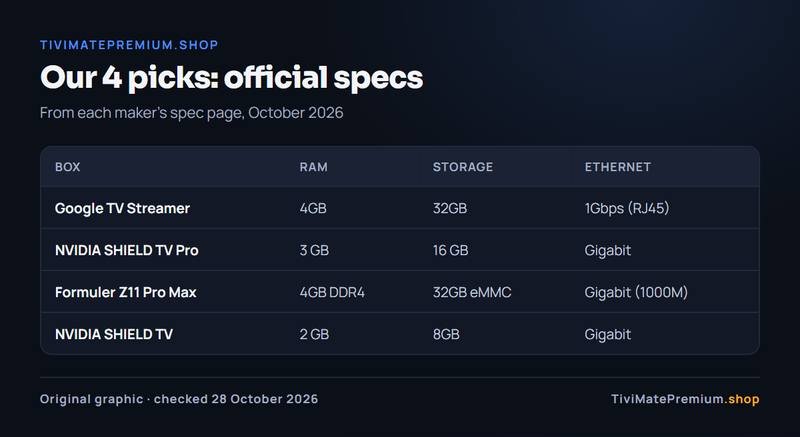
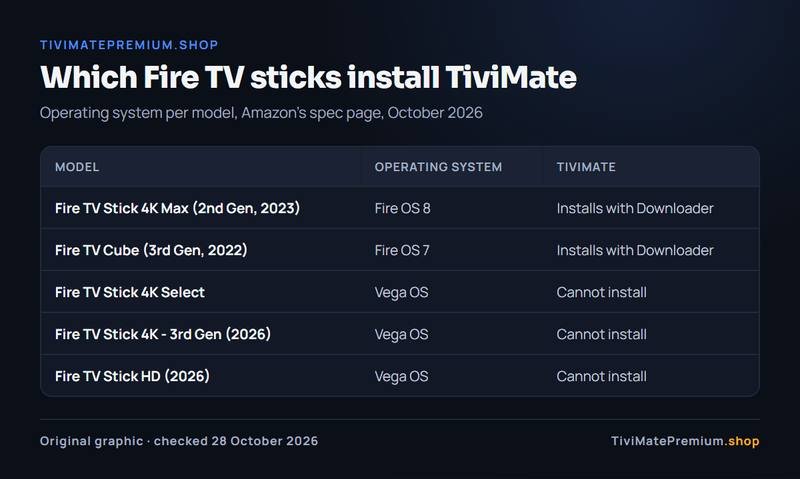
Which streaming sticks, boxes and TVs run TiviMate in 2026, with specs from the manufacturers' pages and no prices. See the best Firestick for TiviMate.
Features
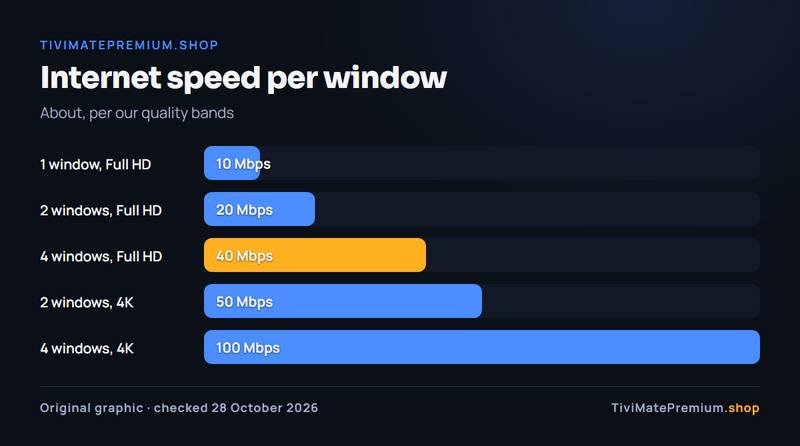
What a TiviMate feature does and how to use it, such as TiviMate Multiview, with what the developer confirms and what it does not.
Buying guides
Help choosing a device, an app or a plan, with clear criteria. The best Android TV box for TiviMate is a good place to start.
Looking for a full guide instead?
Blog posts answer one question each. For complete walkthroughs, the TiviMate guides cover adding a playlist, the TV guide, settings, catch-up and recording, and the app comparisons. The IPTV setup guides cover every device, from a Fire TV Stick to Samsung and LG TVs.
New to TiviMate Premium? Our page on what TiviMate Premium is explains the developer's paid upgrade, which we never sell. We provide the IPTV subscription you watch in it: see the IPTV plans for TiviMate, billed once with no auto-renew.
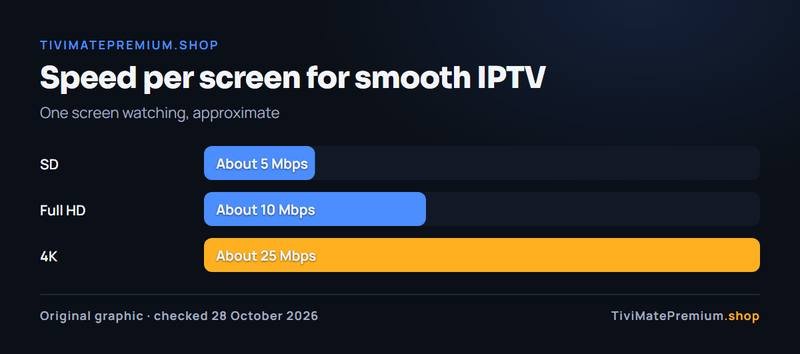
Questions a post does not answer go to our FAQ or to us on WhatsApp, with daily support, usually within the hour. Before setting up on Wi-Fi, run the IPTV speed test on your TV.
Ready to watch in TiviMate?
Plans from $4.16/mo · Billed once, no auto-renew · 7-day money-back