
TiviMate vs IBO Player
By TiviMatePremium.shop · Updated 28 October 2026
TiviMate vs IBO Player is mostly a question of your TV. TiviMate is an Android TV app with its own TV guide, catch-up and recording. IBO Player plays M3U playlists on many smart TVs and computers, is activated by your TV's MAC address and needs a yearly or lifetime licence paid to its developer after a 7-day testing period.
In short
- On Android TV, Google TV, SHIELD or a Fire TV on Fire OS, TiviMate is the stronger app: guide, catch-up and recording are on its feature list.
- IBO Player is a fit for smart TVs and computers, but it has no built-in TV guide and is licensed per device by MAC address.
- Both play our M3U link; TiviMate also takes the Xtream Codes login.
| TiviMate | Android TV, built for a remote |
|---|---|
| IBO Player | M3U player for TVs and computers |
| Activation | IBO: MAC ID and Device Key |
| TV guide | TiviMate built in; IBO needs an EPG-ready provider |
| Licence | IBO: yearly or lifetime, after 7 days |
The short verdict
On an Android TV device, choose TiviMate. It reads our Xtream Codes login, builds the TV guide itself and lists catch-up, recording and Multiview. On a smart TV that cannot run TiviMate, IBO Player is an option, as long as you are happy to activate it with the TV's MAC address and pay its developer for a licence once the 7-day testing period ends.
TiviMate vs IBO Player is not a fair fight on the same device, because the two apps aim at different screens. TiviMate is built for Android TV and a remote. IBO Player shows Samsung, LG webOS, Sony, Android TV, Roku, Apple TV and Windows on its website and offers downloads for Android, Windows, macOS and Linux. That makes IBO Player most useful where TiviMate cannot be installed at all.
Everything below comes from what each developer publishes: the TiviMate website and Google Play listing, and the IBO Player website, its support page and its downloads page. Where a developer does not state something, the table says so. The sources are listed at the end of the page.
TiviMate vs IBO Player: 12 points compared
"Not stated by the developer" means the official pages do not mention it. It may still exist inside the app, but we do not present it as a fact.
| Point | TiviMate | IBO Player |
|---|---|---|
| Developer | Armobsoft FZE | IBO DEV Ltd. |
| Playlist logins | M3U, Xtream Codes, Stalker Portal | M3U and M3U8 playlists |
| Xtream Codes login | Yes | Not stated by the developer |
| TV guide (EPG) | Yes, a full schedule grid | No built-in EPG; works if the provider's EPG is ready for it |
| Catch-up | Yes | Not stated by the developer |
| Recording | Yes | Not stated by the developer |
| Several channels on one screen | Multiview | Not stated by the developer |
| Parental controls | Yes | Yes |
| Activation | Sign in to your TiviMate account | MAC ID and Device Key on iboplayer.com |
| Platforms | Android TV devices | Shown: Samsung, LG webOS, Sony, Android TV, Roku, Apple TV, Windows |
| Free use | Free app, Premium optional | 7-day testing period, then a licence |
| Paid plan | Premium yearly or lifetime | Licence yearly or lifetime, no refunds after purchase |
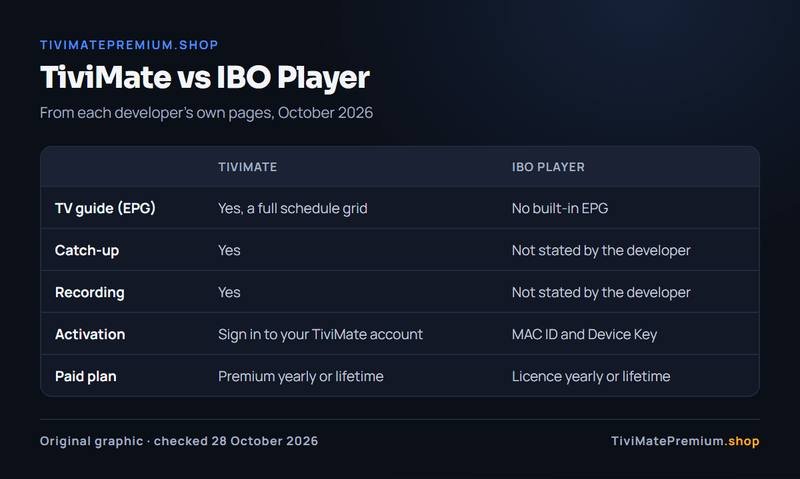
The biggest practical gap is the TV guide. TiviMate builds its own guide grid from the playlist. IBO Player's site says plainly that the app does not have an EPG system integrated, and that a guide works only if your provider has an EPG-ready system.
IBO Player's activation and licence
Activation is the biggest everyday difference in TiviMate vs IBO Player. IBO Player works differently from most apps. According to its support page, the app starts a 7-day testing period by itself on first launch and shows a MAC ID and a Device Key. After that period, you visit iboplayer.com, choose Activate License, enter the MAC ID and Device Key, and complete the purchase. The licence is offered as a yearly or a lifetime plan, paid to its developer.
- Install IBO Player on the TV and open it once.
- Write down the MAC ID and Device Key the app shows.
- Use the 7-day testing period to load your M3U playlist and check playback.
- To keep using it, buy a yearly or lifetime licence on iboplayer.com with the same MAC ID and Device Key.
Warning. IBO Player's website states that there are no refunds after purchase. Use the full testing period on the exact TV you will watch on before you buy the licence.
Two details save time. IBO Player's FAQ notes that each TV has two MAC addresses, one for Wi-Fi and one for Ethernet, so use the one the app shows on screen. And because the licence is tied to that device, a new TV means a new activation. TiviMate works the other way: Premium belongs to your TiviMate account, and you manage your activated devices on tivimate.com or in the Companion app.
Smart TV support
Smart TVs are where TiviMate vs IBO Player turns in IBO's favor. TiviMate is designed for Android TV and has no Samsung or LG app: Samsung TVs run Tizen and LG TVs run webOS, each with its own app store. IBO Player's website shows Samsung, LG webOS, Sony, Android TV, Roku, Apple TV and Windows as compatible devices. Those appear as logos only, with no written list of models, so check the developer's site for your exact TV before you rely on it.
The IBO Player downloads page lists installers for Android, Windows 10 and later, macOS on Intel and Linux. On an Android TV box you could install either app, and on that kind of device TiviMate offers more of the features people look for.
| Device | TiviMate | IBO Player | Our guide |
|---|---|---|---|
| Samsung (Tizen) | No version from the developer | Shown as compatible | Smart TV setup |
| LG (webOS) | No version from the developer | Shown as compatible | Smart TV setup |
| Android TV, Google TV, SHIELD | Yes, from Google Play | Android download offered | Android TV setup |
| Fire TV on Fire OS | Yes, via the Downloader app | Not stated by the developer | Firestick setup |
| Windows and Mac | No version from the developer | Downloads offered | Windows and Mac setup |
Tip. If you own a Samsung or LG TV and want TiviMate's guide and recording, the simplest route is a small Android TV device on the HDMI port. Our Android TV and Google TV setup guide covers it.
TV guide and features
TiviMate describes its EPG as a way to "browse the full program schedule in a fast, clear grid", and it lists catch-up, recording, Multiview, favorite channels, search and parental controls. With our Xtream Codes login, the guide arrives with the playlist and fills in on its own. Our TiviMate EPG guide covers the rare cases where it stays empty.
IBO Player's site lists parental controls and the option to select languages in movies and series. For the guide, its answer is that the app has no EPG system integrated but works with a provider whose EPG is ready for it. Catch-up, recording and watching several channels at once are not mentioned on its pages.
So on TiviMate vs IBO Player features, TiviMate states more. That does not make IBO Player a bad app; it makes it a simpler one, built to play a playlist on TVs where richer players do not run.
Make sure you install the right IBO Player
App stores list several players with names close to IBO Player, from other companies. The one this page compares is run by IBO DEV Ltd. at iboplayer.com. Its own setup guide says to download it from your device's app store, and its downloads page offers the Android APK and versions for Windows, macOS and Linux.
Before you pay for a licence, check that the app's store listing or start screen points to iboplayer.com, and activate it only on iboplayer.com with the MAC ID and Device Key the app shows. A licence bought for a look-alike app does not carry over.
Price model
TiviMate is free to install. TiviMate Premium is sold only by its developer as a yearly subscription or a one-time lifetime purchase, with the price shown at the point of purchase. Our TiviMate Premium price page tracks the US figures.
IBO Player gives a 7-day testing period, then needs a yearly or lifetime licence for each device, paid to its developer, with no refunds after purchase according to its site. Neither app includes channels, so the TiviMate vs IBO Player choice never changes what you watch, only how you watch it.
The channels come from your IPTV subscription. Ours plays in both apps through the M3U link, and in TiviMate through the Xtream Codes login too. Plans start at $4.16/mo and are billed once with no auto-renew: see the IPTV plans for TiviMate and every app.
Choose TiviMate if, choose IBO Player if
Choose TiviMate if
- You watch on Android TV, Google TV, NVIDIA SHIELD or a Fire TV on Fire OS.
- You want a built-in TV guide, catch-up and recording.
- You want to log in with Xtream Codes instead of a long M3U link.
- You want Premium tied to your account rather than to one device.
Choose IBO Player if
- You watch on a smart TV that cannot run TiviMate and you do not want a box.
- A simple M3U player is enough for you.
- You are fine with a licence per device after the 7-day testing period.
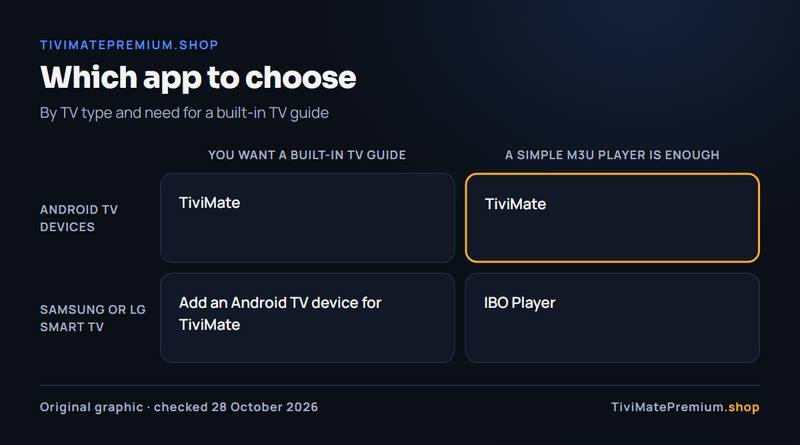
For other options, our best IPTV player apps guide compares more players, and TiviMate vs IPTV Smarters covers the app that also runs on iPhone and Apple TV. Every TiviMate guide is in the TiviMate guides hub.
Message us, and we guide you all the way to your first channel.
Daily support, usually within the hour.
TiviMate vs IBO Player: questions
Is TiviMate better than IBO Player?
On an Android TV device, yes for most people: TiviMate builds its own TV guide and lists catch-up and recording, which IBO Player's pages do not. On a Samsung or LG TV, TiviMate does not run, so IBO Player is the one you can actually install.
Is IBO Player free?
Only for a 7-day testing period, according to its website. After that you need a yearly or lifetime licence for the device, bought on iboplayer.com with your MAC ID and Device Key. Its site says there are no refunds after purchase.
Does IBO Player have a TV guide?
Its site says the app does not have an EPG system integrated, but a guide works if your provider has an EPG-ready system. TiviMate builds its own guide grid from your playlist. With our service, the Xtream Codes login in TiviMate brings the guide automatically, so there is no separate link to add.
Can I use our IPTV in both apps?
Yes. IBO Player plays M3U playlists, so it uses the M3U link we send. TiviMate takes the same M3U link or the Xtream Codes login, which brings the TV guide with it. Each device watching at the same time counts as one screen, so pick a plan with as many devices as you watch on at once.
How do I know I installed the right IBO Player?
Several apps use similar names. The IBO Player on this page comes from IBO DEV Ltd. and is activated on iboplayer.com with the MAC ID and Device Key it shows. If the app points to a different website, it is a different app.
Sources
Official pages we checked for the facts on this page, on 28 October 2026.
Picked your app? Add the channels
Plans from $4.16/mo · Billed once, no auto-renew · 7-day money-back