
Best IPTV player apps in 2026
By TiviMatePremium.shop · Updated 28 October 2026
The best IPTV player apps in 2026 are TiviMate on Fire TV and Android TV, IBO Player on Samsung, LG and Apple devices, and IPTV Smarters as the free option almost everywhere. All of them accept the same Xtream Codes login from TiviMatePremium.shop, so you can try more than one and keep the app you like best.
In short
- TiviMate leads on a Firestick, Android TV, Google TV and Formuler, and the free version covers live TV.
- IBO Player is the easiest IPTV player app on Apple, Samsung, LG and computers, because we activate it for you.
- IPTV Smarters is free on most devices, and VLC is a quick test tool on a computer.
| Apps compared | 8 players |
|---|---|
| Best on Fire TV and Android TV | TiviMate |
| Best on Samsung, LG and Apple | IBO Player |
| Best free option | IPTV Smarters |
| Same login | Works in every app on this page |
Start with your platform
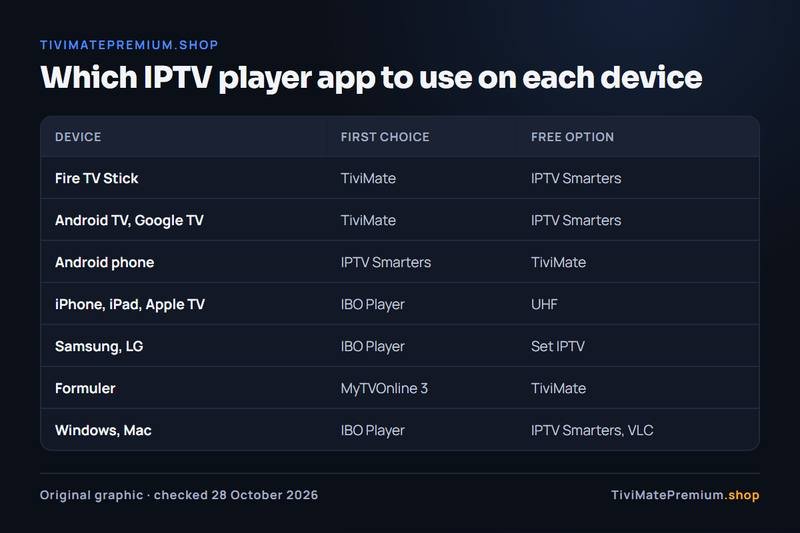
Your device narrows the choice before anything else does. TiviMate, for example, runs only on Android, so it is out on an Apple TV or a Samsung TV. The table shows the first choice and a free alternative for each platform, and the sections below explain how each of the best IPTV player apps works.
| Device | First choice | Free alternative |
|---|---|---|
| Fire TV Stick (Firestick) | TiviMate | IPTV Smarters |
| Android TV and Google TV | TiviMate | IPTV Smarters |
| Android phone and tablet | IPTV Smarters | TiviMate |
| iPhone and iPad | IBO Player | Smarters Player Lite or UHF |
| Apple TV | IBO Player | Smarters Player Lite or UHF |
| Samsung and LG smart TV | IBO Player | Set IPTV (activated by us) |
| Formuler | MyTVOnline 3 | TiviMate |
| Windows and Mac | IBO Player | IPTV Smarters or VLC |
Best IPTV player apps: comparison table
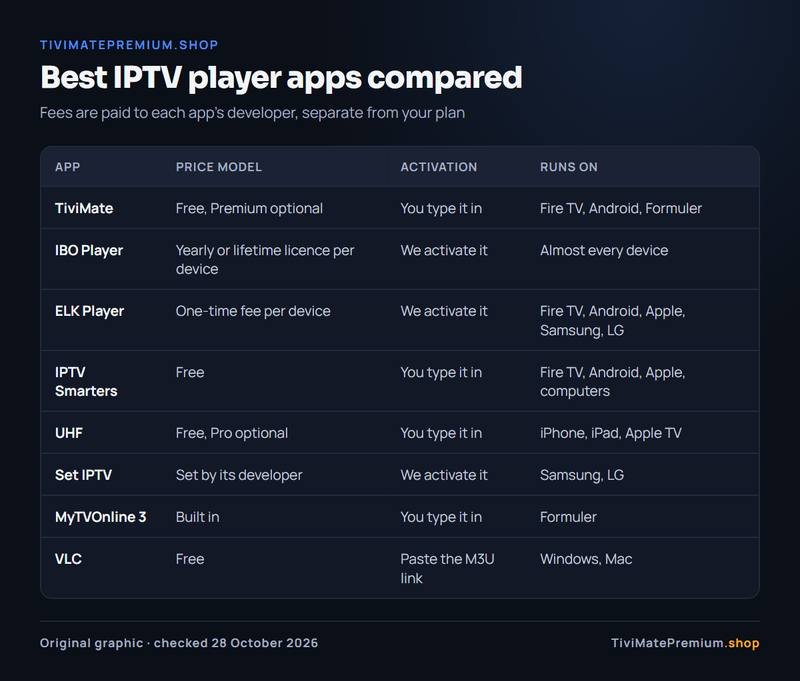
These two tables put the eight best IPTV player apps side by side. The first covers price model, activation and devices. The second covers the TV guide, catch-up and recording, which change between app versions, so where a feature depends on the version or the platform we say so instead of guessing.
| App | Price model | Activation | Devices |
|---|---|---|---|
| TiviMate | Free app, optional Premium paid to its developer | You type it in | Fire TV, Android TV, Google TV, Android, Formuler |
| IBO Player | Yearly or lifetime licence per device after a free period | We activate it | Fire TV, Android, Apple, Samsung, LG, Windows, Mac |
| ELK Player | One-time fee per device after a free period | We activate it | Fire TV, Android, Apple, Samsung, LG |
| IPTV Smarters | Free | You type it in | Fire TV, Android, Apple, Windows, Mac |
| UHF | Free, optional Pro plan | You type it in | iPhone, iPad, Apple TV |
| Set IPTV | Set by its developer | We activate it | Samsung, LG |
| MyTVOnline 3 | Built into the box | You type it in | Formuler |
| VLC | Free | You paste the M3U link | Windows, Mac |
| App | TV guide | Catch-up | Recording |
|---|---|---|---|
| TiviMate | Full grid | With Premium | With Premium |
| IBO Player | Yes | Depends on version | Depends on version |
| ELK Player | Yes | Depends on version | Depends on version |
| IPTV Smarters | Basic | Depends on version | Depends on version |
| UHF | Yes | Depends on version | Depends on version |
| Set IPTV | Yes | Depends on version | Depends on version |
| MyTVOnline 3 | Yes | Depends on model | Depends on model |
| VLC | Not stated by the developer | Not stated by the developer | Not stated by the developer |
The apps compared
Here are the best IPTV player apps one by one: cost, setup, strengths, limits, devices and who each one suits. Every fee mentioned is paid to the app's developer, never to us, and it is separate from your plan.
TiviMate
TiviMate is a free player with an optional Premium upgrade, sold only by its developer: $9.99 a year or $33.99 lifetime on US Google Play in October 2026, for up to 5 devices. Check today's price in the Companion app or on the official TiviMate site. You type the Xtream Codes login yourself. Its strength is the TV guide: a clean grid, quick channel changes and favorites. Its limit is reach, because it runs on Android-based devices only: Fire TV, Android TV and Google TV, Android phones and tablets, and Formuler boxes. Best for anyone with a Firestick or an Android box who wants a big-screen guide built for a remote. Our Firestick guide installs it with Downloader code 272483.
IBO Player
IBO Player, from IBO DEV Ltd. at iboplayer.com, has a free period of 7 days, then a yearly or lifetime licence per device, paid to its developer. On iPhone, iPad and Apple TV it installs from its App Store listing, where the licence is bought as an in-app purchase; install only that listing, because look-alike IPTV apps exist on the App Store. We activate it for you from the Device ID and Key it shows, so there is no long login to type with a remote. Its strength is reach: it runs on Fire TV, Android, Android TV, iPhone, iPad, Apple TV, Samsung, LG, Windows and Mac, the easiest single app for a mixed household. Its limits are the fee, charged per device, and activation going through us. Best for Samsung, LG and Apple owners, and for anyone who would rather not type credentials. See it on a TV in our Samsung and LG smart TV guide.
ELK Player
ELK Player has a free period of 14 days, then a one-time fee per device, paid to its developer. We activate it from your Device ID and Key, just like IBO Player, and on Fire TV it installs with Downloader code 82854. It runs on Fire TV, Android, Android TV, iPhone, iPad, Apple TV, Samsung and LG. Its strengths are the longer free period and a different layout. Its limits are the lack of a Windows or Mac version and a smaller user base than TiviMate or IBO Player. Best for anyone who wants a second activated player to compare, or whose TV store lists ELK Player and not IBO Player.
IPTV Smarters
IPTV Smarters is free, and on Apple devices it is listed as Smarters Player Lite. You type the login: choose Login with Xtream Codes API, then enter the server URL, username and password. It runs on Fire TV (installed with Downloader from the developer's site, getiptvsmarters.com), Android, Android TV, iPhone, iPad, Apple TV, Windows and Mac, which makes it the best free all-rounder. Its limits are a simpler layout than TiviMate and a basic TV guide, and Android phones need the official APK from the developer's site. Best for anyone who wants an IPTV player app that costs nothing and runs on almost every device in the house. If you are choosing between the two big names, read TiviMate vs IPTV Smarters.
UHF
UHF is free, with an optional Pro plan paid to its developer. You type the login: add a playlist, choose Xtream Codes or M3U and enter the details we sent. It runs on iPhone, iPad and Apple TV only. Its strength is a clean design that feels at home on Apple hardware. Its limits are the single platform family and slow typing on an Apple TV remote, unless your iPhone acts as the keyboard. Best for Apple users who want a free player and are happy to type the login once. Our Apple TV setup guide shows the steps.
Set IPTV
Set IPTV is activated through us from the MAC address your TV shows, so there is nothing to type. It runs on Samsung and LG smart TVs, where apps come only from the TV's own store. Its strength is that it exists on both platforms. Its limits are that it appears in fewer stores than IBO Player, and any fee for the app is set by its developer, so check the listing on your TV. Best as the third option on a Samsung or LG smart TV, when your store lists it and not the other two.
MyTVOnline 3
MyTVOnline 3 is built into Formuler boxes, so there is nothing to buy or download. You add a portal, choose Xtream Codes API and type the server URL, username and password, or register the box's MAC address with us instead. It runs on Formuler only. Its strength is that it is made for those boxes. Its limit is that it is tied to one brand. Best for any Formuler owner who wants the simplest route, with TiviMate as the alternative because the box runs Android. The Formuler guide covers both.
VLC
VLC is free from videolan.org. You paste the M3U link into Media, then Open Network Stream. It is excellent for a quick check of any stream. Its limit is serious for daily viewing: it has no TV guide, no catch-up and no channel favorites by category, so it is a playback tool rather than a full IPTV player app. Best for checking that your login works, or for occasional viewing at a desk. For a guide on a computer, use IBO Player or IPTV Smarters, as our Windows and Mac guide shows.
Which player for which device
If you already know your device, this is the short version of the best IPTV player apps for it, in the order we would try them.
- Fire TV Stick and Fire TV: TiviMate, then IPTV Smarters, IBO Player or ELK Player.
- Android TV, Google TV and NVIDIA SHIELD: TiviMate, then IPTV Smarters or IBO Player. See the Android TV guide.
- Android phone and tablet: IPTV Smarters or TiviMate, with IBO Player as the activated option.
- iPhone, iPad and Apple TV: IBO Player from its App Store listing, then Smarters Player Lite, UHF or ELK Player.
- Samsung and LG smart TV: IBO Player, then ELK Player or Set IPTV.
- Formuler: MyTVOnline 3, then TiviMate.
- Windows and Mac: IBO Player or IPTV Smarters, with VLC for quick tests.
Every device has its own step-by-step page in our IPTV setup guides for every device, with the codes, links and screens for each app.
How activation differs
The best IPTV player apps split into two groups by who enters the login: you, or us.
You type it in
TiviMate, IPTV Smarters, UHF and MyTVOnline 3 take the Xtream Codes login: the server URL, username and password from our WhatsApp message. You enter it once and the app loads channels, categories and the guide. It costs nothing and you control every step, but long passwords are slow to type with a TV remote. Our guide to adding a playlist in TiviMate shows where each field goes.
We activate it
IBO Player, ELK Player and Set IPTV identify your device by a Device ID and Key, or by its MAC address. You send us a photo of that screen on WhatsApp, we link it to your plan, and you reopen the app. There is nothing to type, and it usually takes minutes, but it goes through us.
About developer fees
Some of the best IPTV player apps charge a one-time fee after a free period. That money goes to the app's developer, never to us, and it is separate from your IPTV plans for TiviMate and every other player. We list paid apps because they are stable, free of ads and easy for us to activate on a TV. If you would rather pay nothing, TiviMate, IPTV Smarters, UHF and VLC are free, and you can switch later. Fees change, so check each app's own listing on the day you install.
Best IPTV player apps FAQ
What is the best IPTV player for a Firestick?
TiviMate is the best IPTV player for a Firestick, because its guide, favorites and channel switching are built for a remote. It installs with Downloader code 272483. IPTV Smarters is the free alternative, and IBO Player is the option we activate for you.
Which is the best IPTV player app overall?
It depends on the device. TiviMate is the best on Fire TV and Android TV, IBO Player is the easiest on Apple, Samsung and LG, and IPTV Smarters is the best free choice across devices. Your login works in all of them.
Can I use more than one player with the same login?
Yes. Your login works in every player on this page, so you can install two and keep the one you prefer. Your plan limits only how many screens stream at the same time. That makes it easy to test a free player first and switch later without asking us for a new login.
Do these apps include channels?
No. They are players only. The channels come from your IPTV subscription, which you add to the app with an Xtream Codes login or an M3U link. TiviMate Premium is no exception: it unlocks app features, not content. The player decides how the channels look and are organised; the subscription decides what you can watch.
Are the apps safe to install?
Install them only from the official links, the verified Downloader codes or the app stores named in our setup guides. Avoid copies shared on forums or in video descriptions, which can be modified to carry malware or collect your login details. If a source is not listed in the guide for your device, skip it.
TiviMate is ready. Add the channels.
Plans from $4.16/mo · Billed once, no auto-renew · 7-day money-back