
TiviMate Companion app explained
By TiviMatePremium.shop · Updated 28 October 2026
The TiviMate Companion app is the developer's own Android app for buying and managing TiviMate Premium. You install it on an Android phone or tablet, create or sign in to your account, buy Premium, and then sign in on your TV with the same account. It is not a player, it has no iPhone version, and it contains no channels.
In short
- The Companion app is where you create your TiviMate account and buy Premium, on an Android phone or tablet.
- Signing in on the TV with the same account syncs Premium there, on up to 5 devices.
- It plays nothing and holds no channels: those come from the playlist you add to TiviMate.
| Made by | The TiviMate developer |
|---|---|
| Runs on | Android phones and tablets |
| Get it from | Google Play |
| Used for | Account, Premium purchase, devices |
| Channels included | No |
Short answer
Short answer: the TiviMate Companion app is the developer's Android app for buying and managing Premium. In October 2026 Premium cost $9.99 a year or $33.99 lifetime on US Google Play, for up to 5 devices. Get the app from Google Play on an Android phone or tablet. Channels included: no. Check today's price in the Companion app or on the official site.
Quick clarity: TiviMate Premium is the app's paid upgrade, sold by its developer. It unlocks features like recording and multiple playlists, but it includes no channels. TiviMatePremium.shop sells the IPTV subscription, the content you load into TiviMate or any other player. They are two separate purchases.
What the TiviMate Companion app does
Buying and managing a subscription with a TV remote is awkward, so the developer split the job in two. The TiviMate Companion app runs on your phone and handles the account side: creating the account, paying for Premium and seeing which devices use it. The TiviMate player runs on your TV and does the watching.
Think of the phone app as the account office. Most people open it twice: once to buy, and again when a new TV arrives. The rest of the time it can sit unused on the phone while Premium keeps working on every signed-in TV.
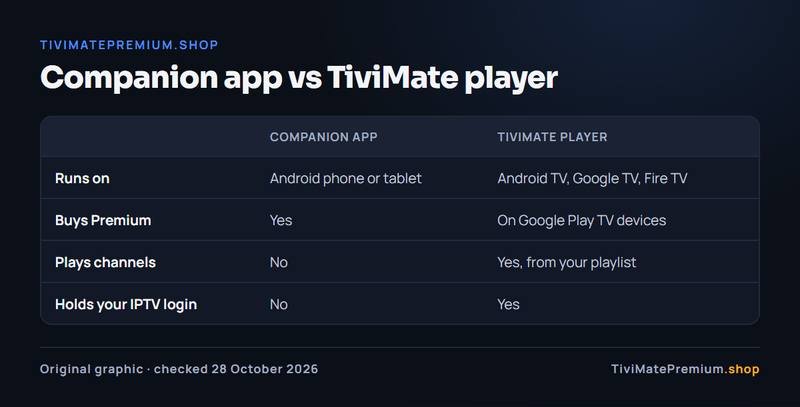
| Task | Companion app (phone) | TiviMate (TV) |
|---|---|---|
| Create a TiviMate account | Yes | No, sign in only |
| Buy Premium | Yes | On Google Play TV devices |
| See devices on the account | Yes | No |
| Play live TV and the guide | No | Yes |
| Hold your IPTV login | No | Yes |
Where to get it
Install the TiviMate Companion app from Google Play on an Android phone or tablet. Search for TiviMate Companion and check that the developer name matches the one on the TiviMate listing, or follow the link on tivimate.com. The app is free to install; you pay only if you buy Premium inside it.
| Device | Companion app | What to do instead |
|---|---|---|
| Android phone | Yes, from Google Play | Nothing: install it |
| Android tablet | Yes, from Google Play | Nothing: install it |
| iPhone or iPad | No version | Borrow any Android device for a few minutes |
| Fire TV or Firestick | Not needed on the TV | Use a phone, then sign in on the TV |
| Android TV or Google TV | Not needed on the TV | Buy in TiviMate or use a phone |
Be careful with lookalikes. An app that uses the TiviMate name but comes from another developer is not the official one, and you should never type your account details into it. The same caution applies to the player: our guide to the official TiviMate download explains how to tell a fake.
How to buy Premium in the TiviMate Companion app
The purchase takes a few minutes. Plans and prices come from the developer and are shown in the app at the moment you buy, in your local currency.
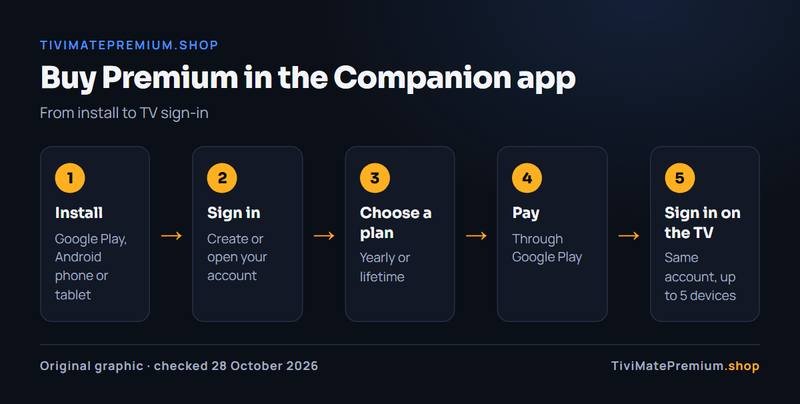
- Open the Companion app and create an account, or sign in to your existing one.
- Confirm your email if the app asks you to.
- Open the Premium section and choose the yearly or lifetime plan.
- Pay through Google Play with the payment method saved on the phone.
- Check that the account now shows Premium as active.
Write down the account username and password: the TV needs exactly the same ones. For screenshots of each purchase step and a comparison of payment routes, see how to buy TiviMate Premium. To choose between the plans, the TiviMate Premium price guide works out the break-even.
How sign-in syncs Premium to the TV
The two apps share one thing: your account. Premium is stored on it, not on the phone and not in a file. When you open TiviMate on the TV, open TiviMate settings and sign in with the account from the TiviMate Companion app, the player checks with the developer's servers and switches the paid features on, usually within a minute.
Nothing moves between the phone and the TV directly, so they do not need to be on the same Wi-Fi. If Premium does not appear, the two apps are almost always signed in to different accounts, so compare the username in each first. The full walkthrough is in how to activate TiviMate Premium on your TV, and the player install for a Fire TV Stick is in our TiviMate on Firestick guide.
Managing devices: up to 5 per account
One Premium account covers up to 5 devices. At the October 2026 US prices, that is about $2 per device per year on the yearly plan, or about $6.80 per device once on lifetime. Check today's price in the Companion app or on the official site. The account area in the app lists the devices signed in, so you can see how many slots are left.
| Situation | What to do |
|---|---|
| New TV or box | Install TiviMate and sign in with the same account |
| Sixth device | Remove one you no longer use, then sign in |
| Sold or gave away a TV | Remove it from the account |
| Reinstalled TiviMate | Sign in again; remove the old entry if it shows twice |
| New phone | Install the Companion app and sign in: Premium stays on the account |
What the Companion app does not do
- It does not play channels, movies or series, and it is not a player.
- It contains no channels, and neither does Premium.
- It has no iPhone or iPad version.
- It does not hold or change your IPTV login, which lives in the TV app.
- It cannot unlock Premium on a device signed in to a different account, or go past the 5-device limit.
If you were hoping it would add content, the TiviMate Premium explainer shows where the developer's product ends and an IPTV subscription begins.
Privacy and what the app holds
The TiviMate Companion app holds your account details and your purchase record, and it needs an internet connection to show them. It does not hold your IPTV login, your playlist or your viewing history, which stay in the TV app.
Use a password for the account that you do not use anywhere else. If you install the TiviMate Companion app on a shared or borrowed phone to make the purchase, sign out afterwards: Premium stays on your account and keeps working on the TV.
Troubleshooting
The app won't open or keeps closing
Update it in Google Play, restart the phone, and check that the phone is online. If it still fails, clear the app's cache in Android settings, or uninstall and reinstall it from Google Play. Your Premium is on the account, so reinstalling loses nothing.
The purchase option is hidden in your country
In some countries the purchase option inside TiviMate on the TV can be hidden or unavailable. The TiviMate Companion app on any Android phone or tablet still works: buy there, and Premium then syncs to the player when you sign in. You do not need a TV that supports purchases.
Paid, but the account shows free
Sign out and back in, and check that you paid with the account you are signed in to. If the payment shows in Google Play but not in the account, contact the developer through tivimate.com: only the developer can see the purchase. For the full list of fixes, see TiviMate Premium not working.
The Companion app and your IPTV subscription
The two are separate purchases from separate sellers. Your IPTV subscription gives you a login that you add to the TV app; the Companion app gives you an account that unlocks the TV app's extra features. Neither one sees the other, and changing one never affects the other.
Our IPTV works without the Companion app: many people add their Xtream Codes login to the free TiviMate app and never install it. See IPTV plans for TiviMate, from $4.16/mo, billed once with no auto-renew, with 20,000+ live channels and 95,000+ movies and series. Not sure you need Premium at all? Read TiviMate free vs Premium.
Buy it if, skip it if
Buy it if
- You want recording, catch-up or multi-view in TiviMate.
- You keep two or more playlists.
- Several TVs at home run TiviMate (up to 5 per account).
- You have an Android phone or tablet to pay on.
Skip it if
- You watch live TV from one playlist.
- You hoped the app would add channels: it does not.
- You only have an iPhone and no Android device to borrow.
- Someone offers Premium codes outside the official app.
Our pick
Install the TiviMate Companion app on an Android phone, and start with the yearly plan at $9.99 to see which features you really use. Choose lifetime at $33.99 if you expect to keep TiviMate more than 4 years. Either way, the app and Premium bring no channels, so you still need an IPTV subscription: compare IPTV subscription prices.
Sources and last checked
Checked 28 October 2026 against tivimate.com and the Google Play listing.
Quick answers
Is the TiviMate Companion app a player?
No. It is the developer's phone app for creating an account, buying Premium and managing devices. You watch in the TiviMate app on your TV, with a playlist from your IPTV provider. The TiviMate Companion app never plays channels, movies or series.
Do I need the Companion app to use TiviMate?
No. The free TiviMate app works without it. You need the Companion app, or the official site, only when you want to buy Premium. On Android TV and Google TV devices with Google Play, the TV app can also offer the purchase itself.
Is there a Companion app for iPhone?
No. The Companion app is for Android phones and tablets only, and TiviMate itself does not run on iPhone or Apple TV. If you only have an iPhone, borrow any Android device for a few minutes to buy, then sign in on your Android-based TV.
How many devices can use Premium?
Up to 5 devices per account. Sign in on each one with the same account, and remove old devices in the Companion app when you reach the limit. Each sign-in uses one slot, and the account area shows how many are left.
Does the Companion app contain channels?
No. It holds your account and purchase details only. Channels come from the playlist you add to TiviMate. That is what an IPTV subscription provides, usually as an Xtream Codes login and an M3U link from the provider. The phone app only handles the account side, so nothing you watch ever passes through it.
Do you sell the Companion app or Premium?
No. Both belong to the TiviMate developer: the app is free to install from Google Play and Premium is sold inside it. We sell the IPTV subscription you load into TiviMate, not the app, Premium, codes or keys. For a problem with your account or a purchase, contact the developer through its official site.
TiviMate is ready. Add the channels.
Plans from $4.16/mo · Billed once, no auto-renew · 7-day money-back