
TiviMate free vs Premium: do you need to upgrade?
By TiviMatePremium.shop · Updated 28 October 2026
In the TiviMate free vs Premium choice, the free app plays live TV from one playlist with a TV guide. Premium is the developer's paid upgrade: multiple playlists, recording, catch-up, multi-view, reminders and guide search. Neither version includes channels. Is TiviMate Premium free? No, and there is no legitimate free Premium account.
In short
- The free app plays live TV and the guide from one playlist, with no time limit.
- Premium adds multiple playlists, recording, catch-up, multi-view, reminders, guide search and auto frame rate.
- It is worth it if you will use one of those features every week; offers of free Premium are not from the developer.
| Free includes | One playlist, live TV, TV guide |
|---|---|
| Premium adds | Recording, catch-up, multi-view and more |
| Premium price | $9.99 a year or $33.99 lifetime (US, Oct 2026) |
| Devices per account | Up to 5 |
| Channels included | No, in either version |
Short answer
Short answer: in TiviMate free vs Premium, the free app is enough for one playlist and live TV. Premium costs $9.99 a year or $33.99 lifetime on US Google Play (October 2026), covers up to 5 devices and is sold by the developer in the TiviMate Companion app or on tivimate.com. Channels included: no. Check today's price in the Companion app or on the official site.
Quick clarity: TiviMate Premium is the app's paid upgrade, sold by its developer. It unlocks features like recording and multiple playlists, but it includes no channels. TiviMatePremium.shop sells the IPTV subscription, the content you load into TiviMate or any other player. They are two separate purchases.
TiviMate free vs Premium: feature table
This TiviMate free vs Premium table compares the two versions feature by feature. The list comes from the developer's own description of the upgrade, and the developer can change it, so treat it as a snapshot of October 2026.
| Feature | Free | Premium |
|---|---|---|
| Playlists | One | Multiple |
| Live TV | Yes | Yes |
| TV guide (EPG) | Yes | Yes |
| Favorites and custom groups | Basic | Yes |
| Customizable channel list and guide | No | Yes |
| Catch-up | No | Yes, where the provider supports it |
| Recording | No | Yes |
| Multi-view | No | Yes |
| Program reminders | No | Yes |
| TV guide search | No | Yes |
| Auto frame rate | No | Yes |
| Price | Free | $9.99 a year or $33.99 lifetime (US, Oct 2026) |
| Channels included | No | No |
The last row is the one people miss. Both versions are players: they show whatever playlist you load, and neither comes with content. The upgrade changes how you control the app, not what you can watch.
Do I need TiviMate Premium?
You need Premium when the free app stops doing something you do every week. If you watch live TV from one playlist, open the guide and pick a channel, you do not need it. If you record, keep a second playlist, replay programs with catch-up or want two channels on screen at once, you do.
A simple way to settle TiviMate free vs Premium: use the free app for a month and write down each time you wish it did more. If the same feature keeps appearing, upgrade. If the list stays empty, keep your money. Upgrading later loses nothing, because the free install becomes Premium in place.
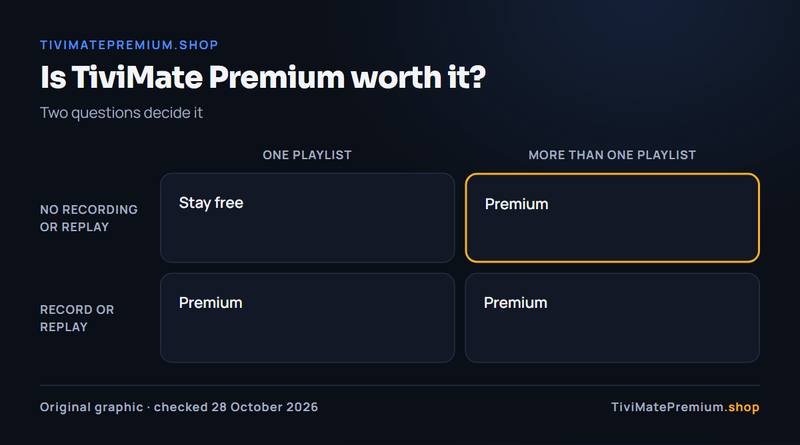
| If you... | Choose |
|---|---|
| Watch live TV from one playlist | Free |
| Want to record sport or series | Premium |
| Keep two or more playlists | Premium |
| Rely on catch-up inside the app | Premium |
| Want to watch two channels at once | Premium |
| Are still choosing an IPTV provider | Free, then decide |
Is TiviMate Premium worth it? Verdict by household
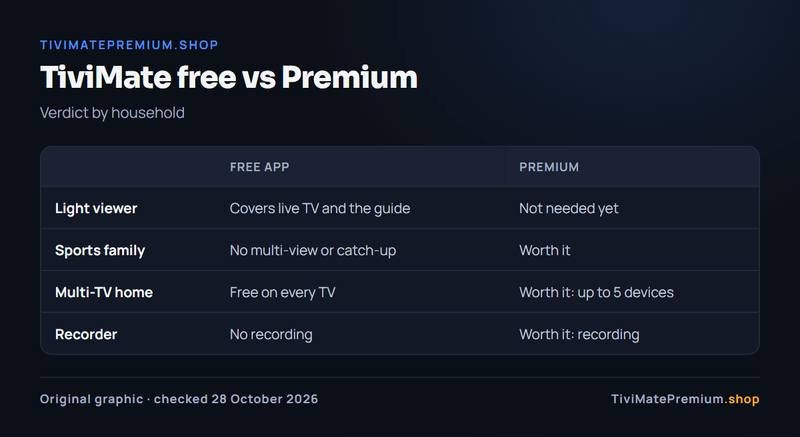
The TiviMate free vs Premium verdict depends less on the app and more on how your home watches TV. Here are four typical households, and whether the upgrade is worth it for each.
The light viewer
You watch a handful of channels in the evening, mostly live, from one playlist. The free app covers all of it: live TV, the guide and channel switching with the remote. Premium features such as recording or multi-view would sit unused, so the upgrade is not worth it for you yet. Stay on the free version, keep the money, and revisit the question only if your habits change, for example when you start missing programs you wanted to see.
The sports family
Matches overlap, kick-off times clash with dinner and someone always wants to see the other game. Multi-view puts two channels on screen at once, catch-up replays the start of a match you joined late, where your provider supports it, reminders stop you missing kick-off, and guide search finds the game fast. For a household like this, Premium is worth it in the first month, and at $9.99 a year the cost per match watched is tiny compared with what the content itself costs.
The multi-TV home
Living room, bedroom, kitchen and a child's room: four screens, each running TiviMate. One Premium account covers up to 5 devices, so the whole home upgrades for a single price. At the October 2026 US prices that is about $2 per device per year on the yearly plan, or about $6.80 per device once on lifetime. If several of those TVs would use recording, catch-up or a second playlist, the upgrade is clearly worth it for you.
The recorder
You work shifts, travel, or simply prefer to watch on your own schedule. Recording is the feature you cannot get in the free app, and it is the one many long-term users say they would not give up. Scheduled recordings from the guide turn live channels into something much closer to a personal video recorder at home. If recording is the reason, upgrade before the event you care about, not after, because nothing records until Premium is active.
TiviMate free vs Premium: what each costs
The free app costs nothing and has no time limit. Premium had two plans on US Google Play in October 2026. Google Play shows the local price in each country, so check today's price in the Companion app or on the official site.
| Plan | Price | Devices | Cost per device |
|---|---|---|---|
| Free app | $0 | Any | $0 |
| Premium yearly | $9.99 a year | Up to 5 | About $2 a year |
| Premium lifetime | $33.99 once | Up to 5 | About $6.80 once |
Lifetime pays for itself in year 4: $33.99 divided by $9.99 is 3.4 years. The TiviMate Premium price breakdown shows the full break-even, and the step-by-step buying guide shows where to pay. After paying, activate Premium on your TV by signing in.
Our IPTV works in both versions
Whichever side of TiviMate free vs Premium you pick, you still need a playlist. Our IPTV subscription loads into the free app and into Premium in exactly the same way, with an Xtream Codes login and an M3U link sent on WhatsApp and by email, usually within minutes.
See IPTV plans that work in TiviMate: from $4.16/mo, billed once with no auto-renew, with 20,000+ live channels and 95,000+ movies and series in 4K, FHD and HD. Start on the free app, and add Premium from the developer later only if you want the extra features.
Buy it if, skip it if
Buy it if
- You want to record sport or series.
- You keep two or more playlists.
- You want multi-view, catch-up or guide search.
- Several TVs at home run TiviMate (up to 5 per account).
Skip it if
- You watch live TV from one playlist.
- You hope Premium adds channels: it does not.
- Your problem is buffering or an empty guide.
- You are still testing a new IPTV provider.
Our pick
Start free. When a Premium feature becomes something you want every week, take the yearly plan at $9.99 to confirm it is worth it. Switch to lifetime at $33.99 only if you expect to keep the app more than 4 years. Either way, the app needs a playlist, so you still need an IPTV subscription: compare IPTV subscription prices.
Sources and last checked
Checked 28 October 2026 against tivimate.com and the Google Play listing.
Quick answers
Is TiviMate Premium free?
No. The TiviMate app has a free version, and Premium is a paid upgrade sold by the developer, at $9.99 a year or $33.99 lifetime on US Google Play in October 2026. Check today's price in the Companion app or on the official site. Pages offering free Premium are not from the developer.
Is a TiviMate Premium account free anywhere?
No legitimate one exists. Premium is tied to an account that has paid the developer. Free accounts, codes or cracked apps carry the risk of malware, a blocked account or stolen details. The safe free option is the official free app with one playlist.
Is TiviMate Premium worth it for one TV?
It is worth it if you will use recording, multiple playlists, catch-up or multi-view every week. For one TV and live viewing from a single playlist, the free app does the job. Try the free app for a month and note what you miss.
Will my settings carry over when I upgrade?
Yes. Your playlist, favorites and settings stay in place. Premium switches on inside the same installation when you sign in to your paid account on the TV, so there is nothing to reinstall or reconfigure. The same applies on each of up to 5 devices: sign in on each one and its own setup stays as it was.
Can I watch catch-up on the free app?
Not in TiviMate: catch-up is one of the Premium features, and it also needs a provider that offers replay for the channel. Other player apps handle catch-up their own way, which our guide to IPTV player apps compares. If replay matters to you, check both points before you pay for the upgrade.
Does Premium include channels?
No. Neither the free app nor Premium includes channels. Both play the playlist you add, usually an Xtream Codes login or an M3U link from an IPTV provider. That subscription is a separate purchase from a separate seller. Once the playlist is added, the free app already shows the channels and the guide; the upgrade only changes the features around them.
TiviMate is ready. Add the channels.
Plans from $4.16/mo · Billed once, no auto-renew · 7-day money-back