
TiviMate Premium APK: what is safe to install
By TiviMatePremium.shop · Updated 28 October 2026
There is no separate TiviMate Premium APK. TiviMate is one app, and Premium unlocks when you sign in to an account that has paid the developer. Any file sold or shared as a TiviMate Premium APK is either the normal app renamed or a cracked copy that can carry malware. Install only from Google Play or with Downloader code 272483.
In short
- There is one TiviMate app: Premium unlocks by signing in, not by installing a special file.
- Official sources: Google Play on Android TV, and Downloader code 272483 on a Firestick or Fire TV.
- Cracked and modded files can carry malware, break updates and get your account blocked.
| Separate Premium APK | None exists |
|---|---|
| Downloader code | 272483 |
| Official file host | files.tivimate.com |
| How Premium unlocks | Sign in to a paid account |
| Channels included | No |
Short answer
Short answer: install the one official app, then unlock Premium by signing in. Premium cost $9.99 a year or $33.99 lifetime on US Google Play in October 2026, covers up to 5 devices, and is sold in the TiviMate Companion app or on tivimate.com. Channels included: no. Check today's price in the Companion app or on the official site.
Quick clarity: TiviMate Premium is the app's paid upgrade, sold by its developer. It unlocks features like recording and multiple playlists, but it includes no channels. TiviMatePremium.shop sells the IPTV subscription, the content you load into TiviMate or any other player. They are two separate purchases.
There is no separate TiviMate Premium APK
People search for a TiviMate Premium APK because they expect a second, paid version of the app. There is not one. The developer publishes a single app, and Premium is a status on your account: when you sign in to an account that has paid, the extra features switch on inside the same installation.
So a file labelled TiviMate Premium APK is one of two things. Either it is the normal free app with a misleading name, or it is a copy someone altered to switch the paid features on without payment. The first is pointless, the second is dangerous. Neither is the developer's file.
| Search | What it really is | Safe answer |
|---|---|---|
| TiviMate Premium APK | A renamed or cracked copy | Install the official app, then sign in |
| TiviMate mod APK | An altered file | Avoid it |
| TiviMate APK for Firestick | The official app | Downloader code 272483 |
| Latest TiviMate APK | An update | Google Play or tivimate.com/download |
Why people look for a TiviMate APK
Searches for a TiviMate Premium APK usually come from one of three situations. A Fire TV owner cannot find TiviMate in the Amazon Appstore and needs another way to install it. Someone sees an offer of free Premium and wants the file. Or the app stopped working and they are hunting for an update.
Each has a safe answer. For the first and the third, use Downloader code 272483 or Google Play. For the second, there is no free Premium: the file on offer is a cracked TiviMate Premium APK, and the risk costs far more than the $9.99 a year the real upgrade cost on US Google Play in October 2026. Check today's price in the Companion app or on the official site.
Official TiviMate download links
The developer supports three sources. Two install the player, one handles your account. Anything else, including mirror sites and links in messages, is not the developer's file.
| Source | Devices | What you get | How to reach it |
|---|---|---|---|
| Google Play | Android TV, Google TV, NVIDIA SHIELD | The TiviMate player | Search TiviMate in Google Play on the TV |
| Developer download | Firestick, Fire TV, boxes without Google Play | The TiviMate player from files.tivimate.com | Downloader code 272483 or tivimate.com/download |
| Companion app | Android phone or tablet | Your account and the Premium purchase | Google Play on the phone, linked from tivimate.com |
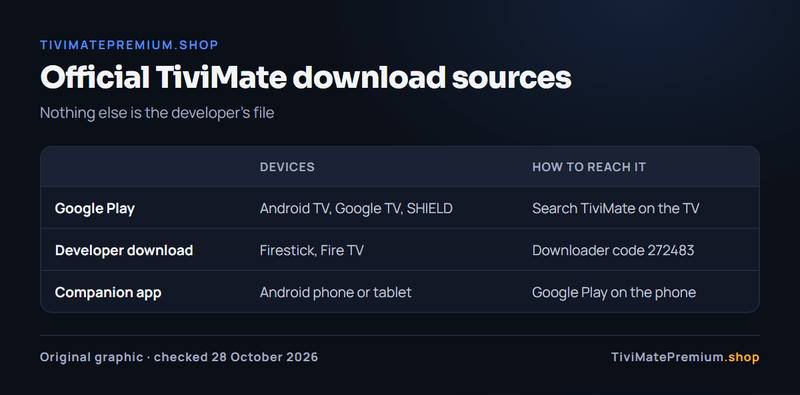
The TiviMate Companion app guide explains what the phone app does, and the Android TV and Google TV setup guide covers the Google Play install.
TiviMate downloader code: 272483
The Downloader code for TiviMate is 272483. Type it into the Downloader app on a Firestick or any Fire TV device, select Go, and the official file from files.tivimate.com starts downloading. You can also type the address tivimate.com/download, which opens the same file.
Prefer to type an address? Use tivimate.com/download instead.
- On the Fire TV Stick, install Downloader from the Amazon Appstore.
- In Settings, allow Downloader to install unknown apps.
- Open Downloader, enter 272483 and select Go.
- Install the file, then delete it to free space.
- Open TiviMate and add your playlist.
A Downloader code is only safe when it opens the developer's own file, so use this one and no other. Codes shared on forums can point anywhere. For the full walkthrough with screens, follow our TiviMate on Firestick install guide.
Why a cracked TiviMate Premium APK is risky
Every cracked or modded TiviMate Premium APK carries the same risks, whatever site offers it, because nobody responsible stands behind the file.
- It can contain malware that reads data on your device or your home network.
- It cannot update safely, so bugs and security holes stay.
- Signing in on it can get your TiviMate account blocked.
- It may show ads or redirect your traffic.
- Nobody fixes it when it breaks, and the developer will not support it.
How to tell a fake TiviMate APK
Four checks catch almost every fake: where the file comes from, its name and size, the permissions it asks for, and what it promises.
| Check | Official app | Fake APK |
|---|---|---|
| File source | Google Play or files.tivimate.com | A mirror site, a forum or a message link |
| File name | Plain TiviMate | Words like Premium, Pro, Mod, Cracked or Unlocked |
| File size | Matches the official download | Noticeably larger or smaller |
| Permissions | What a player needs | Contacts, SMS or other data a player never needs |
| Premium | Unlocks only after sign-in | "Premium unlocked" with no account |
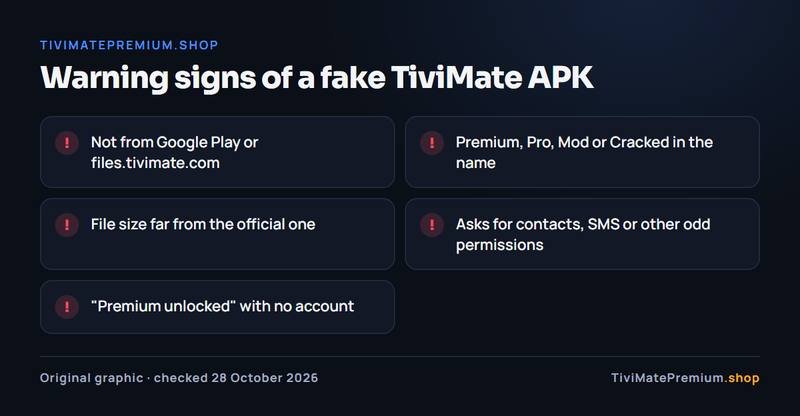
Also be wary of download pages covered in ads and countdown buttons, or that ask for a survey, a code or a payment before the file. The developer never sells Premium through a file.
Already installed a modded TiviMate? What to do
Act now, before you sign in to anything else on that device. The order matters: remove the file first, then secure your accounts.
- Uninstall the modded app and delete the downloaded file.
- Restart the device.
- Change the passwords you used on that device, starting with your TiviMate account and email.
- Run a security scan if the device supports one.
- Reinstall TiviMate from Google Play or with Downloader code 272483.
- Sign in to a paid account if you want Premium.
Your IPTV login is safe to add again on the clean install. If you suspect it was seen by the modded app, message us and we can change it.
Updating TiviMate safely on Fire TV and Android TV
On Google Play devices, updates arrive through the store. On a Fire TV, check now and then for a newer version, and install it the same official way you installed the app.
- Download updates with Downloader code 272483 or through Google Play, never from a link in a message.
- Install over the old version, so your playlist and settings stay.
- Open TiviMate afterwards and check that Premium still shows as active.
- Turn off unknown-app installs for any app that no longer needs them.
What about other player apps?
The same rule applies to every player: install from the developer or an official store. IPTV Smarters, IBO Player and VLC all have official sources, and TiviMate does not run at all on Samsung, LG, Roku or Apple TV. Our comparison of IPTV player apps names the right app and its official link for each device, so you never need an APK site.
After the install: add a playlist
A clean TiviMate install, free or Premium, opens empty, because the app is a player and includes no channels. You add an Xtream Codes login or an M3U link from an IPTV provider.
Our IPTV plans for TiviMate start from $4.16/mo, billed once with no auto-renew, with 20,000+ live channels and 95,000+ movies and series in 4K, FHD and HD. The login arrives on WhatsApp and by email, usually within minutes.
Buy it if, skip it if
Buy it if
- You want recording or catch-up inside TiviMate.
- You keep two or more playlists.
- You were tempted by a cracked file: the real thing is safer and cheap.
- Several TVs at home run TiviMate (up to 5 per account).
Skip it if
- You only watch live TV from one playlist.
- You expect Premium to add channels: it does not.
- Your TV runs Samsung, LG or Apple TV software, where TiviMate does not run.
- Someone offers Premium as a file, code or shared account.
Our pick
Skip every APK site. Install the official app from Google Play or the developer, try the free version, and if you want the extras, buy the yearly plan at $9.99 to test them. Choose lifetime at $33.99 if you will keep the app more than 4 years. Premium has no channels, so you still need an IPTV subscription: see IPTV subscription prices.
Sources and last checked
Checked 28 October 2026 against tivimate.com and the Google Play listing.
Quick answers
Is there a TiviMate Premium APK?
No. There is one TiviMate app, and Premium unlocks when you sign in to an account that paid the developer. Files sold or shared as a Premium APK are renamed or cracked copies. Install the official app and buy Premium in the Companion app or on tivimate.com.
What is the TiviMate Downloader code?
The code is 272483. Enter it in the Downloader app on a Firestick or Fire TV and it opens the official file from files.tivimate.com. You can also type tivimate.com/download. Do not use other codes shared online, because they can point to modified files.
Is a cracked TiviMate APK safe?
No. Cracked files can contain malware, cannot update safely and can get your TiviMate account blocked when you sign in. The only safe installs come from Google Play or the developer's own download, and Premium itself is a paid account, never a file.
Is TiviMate on the Amazon Appstore?
Not as an official listing. On a Fire TV Stick or Fire TV Cube, install Downloader from the Appstore, then use code 272483 to fetch the developer's file. Our Firestick setup guide shows every screen, from enabling unknown apps to the first launch.
Does the official APK include Premium?
The official file is the full app. The paid features stay locked until you sign in to a Premium account, and they unlock on that same installation. There is nothing extra to download when you upgrade, which is why any TiviMate Premium APK is a red flag.
Will I lose my playlist if I reinstall from the official source?
Possibly, unless you restore a TiviMate backup. Keep your IPTV login details, the Xtream Codes server URL, username and password or the M3U link, so you can add the playlist again in a minute on the clean install. Premium itself is not lost: sign in to the same account again and the paid features unlock on the new installation.
TiviMate is ready. Add the channels.
Plans from $4.16/mo · Billed once, no auto-renew · 7-day money-back