
TiviMate vs IPTV Smarters
By TiviMatePremium.shop · Updated 28 October 2026
TiviMate vs IPTV Smarters comes down to the screen you watch on. TiviMate is designed for Android TV and a remote, and its developer lists recording, catch-up and Multiview. IPTV Smarters runs on more platforms, including iPhone, Apple TV, smart TVs and computers, but its official pages do not list recording. Both play our Xtream Codes login and M3U link.
In short
- On an Android TV box or a Fire TV on Fire OS, TiviMate is the stronger pick: recording, catch-up and Multiview are all on its official feature list.
- On iPhone, iPad, Apple TV, a Samsung or LG TV, or a computer, IPTV Smarters is the app that actually runs there.
- Both are free to install with a paid upgrade, and both accept the Xtream Codes login we send.
| TiviMate | Android TV, built for a remote |
|---|---|
| IPTV Smarters | Phones, Apple TV, smart TVs, computers |
| Recording | Listed by TiviMate only |
| Both accept | Xtream Codes and M3U |
| Price model | Free app plus a paid upgrade, in both |
The short verdict
Pick by device, not by reputation. On Android TV, Google TV, NVIDIA SHIELD or a Fire TV on Fire OS, choose TiviMate: it is built for large screens and a remote, and it lists recording, catch-up and Multiview. On iPhone, iPad, Apple TV, Samsung and LG TVs or a computer, choose IPTV Smarters, because TiviMate does not run there.
Most articles on TiviMate vs IPTV Smarters argue about which interface feels nicer. That matters less than it sounds. The real split is that TiviMate is an Android TV app and nothing else, while IPTV Smarters covers phones, Apple devices, smart TVs and desktop computers. If your TV device can run both, TiviMate offers more of the features people switch apps for. If it cannot, the choice is already made.
Everything on this page comes from what each developer publishes: the TiviMate website and Google Play listing, and the IPTV Smarters website, its terms and its Apple App Store listing. Where a developer does not state something, we say so instead of guessing. The sources are listed at the end.
TiviMate vs IPTV Smarters: 12 points compared
The table puts the two apps side by side on the points buyers ask us about most. "Not stated by the developer" means the official pages do not mention it, not that the feature is missing for certain.
| Point | TiviMate | IPTV Smarters |
|---|---|---|
| Developer | Armobsoft FZE | WHMCS Smarters |
| Playlist logins | M3U, Xtream Codes, Stalker Portal | Xtream Codes API login and M3U playlists |
| TV guide (EPG) | Yes, a full schedule grid | Yes, an electronic programme guide |
| Catch-up | Yes | Yes, when the media source provides it |
| Recording | Yes | Not stated by the developer |
| Several channels on one screen | Multiview | Multi-Screen / Multi-View on supported devices |
| Parental controls | Yes | Yes |
| External player | Not stated by the developer | Yes |
| Subtitles and picture-in-picture | Not stated by the developer | Yes |
| Platforms | Android TV devices | Android, iOS, Android TV, smart TVs, macOS, Windows |
| Phones and tablets | Not optimized for touch devices | Yes, Android and iOS |
| Price model | Free, Premium yearly or lifetime | Free, Premium auto-renews |
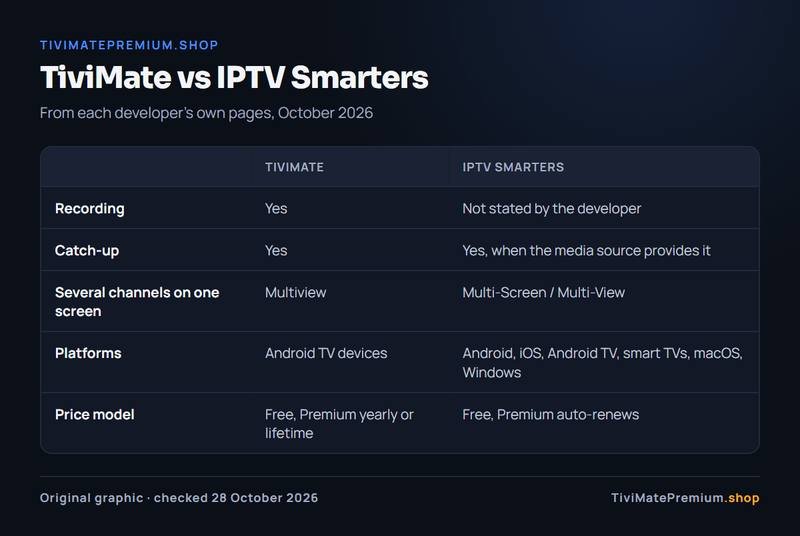
Two rows decide most choices. Recording appears on TiviMate's feature list and not on any official IPTV Smarters page. Platforms run the other way: IPTV Smarters reaches devices TiviMate never will, such as an iPhone or an LG TV.
Interface: a TV app against an everywhere app
TiviMate's Google Play listing describes a "refined, intuitive and customizable interface tailored for large screens" and says the app is "designed for Android TV and remote control navigation". It also warns that it is "not optimized for touch devices such as phones or tablets". In practice that means a channel list and guide you move through with the arrow keys, and a look you can adjust, which the developer calls personalization of the look and layout.
IPTV Smarters takes the opposite route. The same player family runs on phones, tablets, TVs and computers, so it is built to work with a finger, a mouse or a remote. That makes it the natural choice when one household mixes an iPad, a Windows laptop and a smart TV, and wants the same app on each.
Neither developer publishes screenshots of every menu, so we do not rank the two layouts against each other. If you watch on a TV with a remote, start with TiviMate. If most viewing happens on a phone, IPTV Smarters is designed for it and TiviMate is not.
TV guide and catch-up
On the TV guide, TiviMate vs IPTV Smarters is close to a tie. Both apps list one. TiviMate describes its EPG as a way to "browse the full program schedule in a fast, clear grid", and IPTV Smarters lists an "Electronic Programme Guide (EPG)" on its features page. With an Xtream Codes login, the guide data comes with the login, so on our service it fills in on its own in either app.
Catch-up works the same way in principle: the app plays past programmes that the IPTV service keeps in its archive. TiviMate lists catch-up to "access past broadcasts". IPTV Smarters lists catch-up "when provided and supported by the user's media source". Our plans include a full EPG and 7-day catch-up, so both apps can use it.
IPTV Smarters' terms add one detail: the ability to add external EPG sources is part of its paid upgrade. With our Xtream Codes login you do not need an external source, because the guide arrives with the playlist. Our TiviMate EPG guide covers what to do when a guide stays empty.
Recording and Multiview
This is the clearest gap in TiviMate vs IPTV Smarters. TiviMate's official feature list includes "Recording: Record your favorite shows to watch later". We found no mention of recording on the IPTV Smarters website, its features page or its terms. If you want to record a match or a series episode on the TV, TiviMate is the app that says it does it.
Both apps let you watch more than one channel on one screen. TiviMate calls it Multiview and describes it as watching "multiple channels at once on a single screen". IPTV Smarters lists "Multi-Screen / Multi-View: Watch multiple compatible streams simultaneously on supported devices". Neither developer publishes how many windows you get, so check on your own device before you rely on it.
Each extra window is a separate stream and needs its own share of your internet speed: about 10 Mbps for each Full HD channel. Our post on TiviMate Multiview works through the numbers.
Devices: where each app runs
Devices are where TiviMate vs IPTV Smarters stops being close. TiviMate runs on Android TV devices: Google TV boxes, NVIDIA SHIELD, Android TV televisions and Fire TV models on Fire OS. It installs from Google Play, or through the Downloader app with code 272483, which our TiviMate on Firestick guide walks through. Fire TV models on Amazon's Vega OS cannot install it.
IPTV Smarters lists Android, iOS, Android TV, smart TVs, macOS and Windows on its website. On Apple devices the app is called Smarters Player Lite and runs on iPhone, iPad and Apple TV. On LG TVs you search the LG store for IPTV Smarters Player. For Samsung, the developer says to search its app store, and that while its updated Samsung app is in review you can install it from a USB drive instead. Fire TV and Roku are not mentioned on its pages.
| Device | TiviMate | IPTV Smarters | Our guide |
|---|---|---|---|
| Fire TV on Fire OS | Yes, via the Downloader app | Not stated by the developer | Firestick setup |
| Android TV, Google TV, SHIELD | Yes, from Google Play | Yes, Android TV is listed | Android TV setup |
| iPhone and iPad | No version from the developer | Yes, Smarters Player Lite | iPhone and iPad setup |
| Apple TV | No version from the developer | Yes, Smarters Player Lite | Apple TV setup |
| Samsung and LG TVs | No version from the developer | Yes, from the TV's app store | Smart TV setup |
| Windows and Mac | No version from the developer | Yes | Windows and Mac setup |
A mixed household often ends up with both: TiviMate on the living room TV and IPTV Smarters on phones and the bedroom smart TV. One IPTV plan covers either app, and each device watching at the same time counts as one screen on your plan.
Price: two free apps with paid upgrades
Both apps are free to install, and neither includes channels. TiviMate Premium is sold only by its developer as "a one-time lifetime purchase and one or more auto-renewing subscriptions", with prices "shown at the point of purchase". On a device without Google Play, Premium is unlocked through the TiviMate Companion app. Our page on the TiviMate Premium price tracks the US figures.
IPTV Smarters' terms say the app "is available for free" and that its Premium is paid "in advance on a monthly basis or some other recurring interval basis" and "will automatically renew". No price is stated on its official pages; the Apple listing shows only that the app is free with in-app purchases.
One detail to know: the two IPTV Smarters pages disagree on what is free. Its terms list Master Search, external EPG sources, picture-in-picture, parental control, Chromecast casting and adding an external player as Premium features. Its features page lists parental controls, picture-in-picture and external player support without any Premium label. Check inside the app on your device before you count on one of those for free.
Whichever side of TiviMate vs IPTV Smarters you land on, the channels come from an IPTV subscription. Ours works in both, starts at $4.16/mo and is billed once with no auto-renew: see the IPTV plans for TiviMate and every app.
Choose TiviMate if, choose IPTV Smarters if
Choose TiviMate if
- You watch on an Android TV box, Google TV, NVIDIA SHIELD or a Fire TV on Fire OS.
- You want to record programmes; recording is on TiviMate's official feature list.
- You use a remote and want an app designed for it.
- You want more than one playlist in the same app; multiple playlists are on its list.
Choose IPTV Smarters if
- You watch on an iPhone, iPad or Apple TV, where TiviMate does not run.
- You have a Samsung or LG TV and no box to plug in.
- You want the same app on Windows or a Mac as well as on the TV.
- You need subtitles or an external player, which its features page lists.
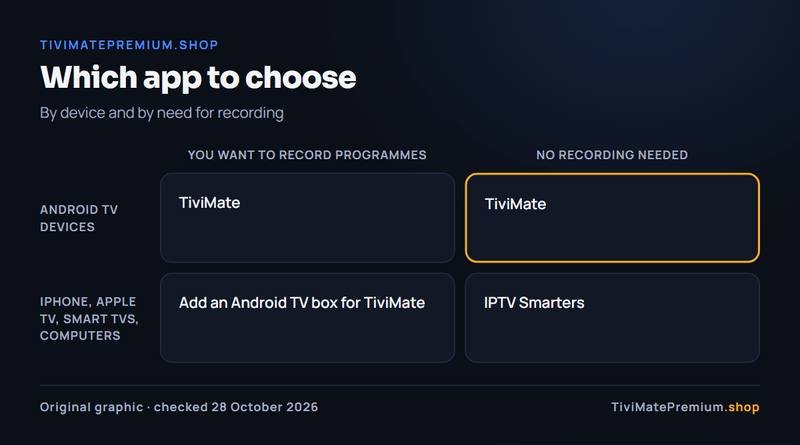
Still between two? The best IPTV player apps guide compares more players, and TiviMate vs IBO Player covers the other common smart TV choice.
Setting up either app with our IPTV
After you order, we send an Xtream Codes login (server URL, username and password) and an M3U link on WhatsApp and by email. Both sides of TiviMate vs IPTV Smarters accept the Xtream Codes login, which is quicker to type with a remote and brings the TV guide with it.
- Install the app for your device from the table above.
- Choose the Xtream Codes login type and enter the server URL, username and password exactly as sent.
- Wait for the channel list and the TV guide to load, then start a channel to check playback.
For TiviMate, the guide to adding a playlist in TiviMate covers Xtream Codes, M3U and the errors people hit most. All our TiviMate guides are collected in the TiviMate guides hub.
Message us, and we guide you all the way to your first channel.
Daily support, usually within the hour.
TiviMate vs IPTV Smarters: questions
Is TiviMate better than IPTV Smarters?
On an Android TV device, TiviMate offers more of what people switch for: recording, catch-up and Multiview are on its official list, and it is designed for a remote. On iPhone, Apple TV, smart TVs and computers, IPTV Smarters is better simply because TiviMate does not run there.
Can IPTV Smarters record?
Recording does not appear on the IPTV Smarters website, its features page or its terms. TiviMate lists recording on its official feature list. If recording matters to you, use TiviMate on an Android TV device. Check the Unlock Premium screen in the app to see whether recording is unlocked on your account, and keep enough free storage for the files.
Does IPTV Smarters work on iPhone and Apple TV?
Yes. On Apple devices the app is called Smarters Player Lite, and its App Store listing covers iPhone, iPad and Apple TV. TiviMate has no iPhone or Apple TV version. If your home mixes Apple and Android devices, the same login works in both apps, so each TV can use the player that suits it.
Can I use both apps with one IPTV subscription?
Yes. Our Xtream Codes login works in both apps. Each device watching at the same time counts as one screen, so pick a plan with as many devices as you watch on at once. You can also install both apps on the same TV and keep the one you prefer.
Are TiviMate and IPTV Smarters free?
Both are free to install and both sell a paid upgrade. TiviMate Premium is yearly or lifetime, sold only by its developer. IPTV Smarters Premium renews automatically. Neither app includes channels: those come from a separate IPTV subscription, which you add to either app with the same login. Our plans are billed once, no auto-renew.
Sources
Official pages we checked for the facts on this page, on 28 October 2026.
- TiviMate official website (tivimate.com)
- TiviMate terms of use (tivimate.com)
- TiviMate IPTV Player on Google Play
- TiviMate Companion on Google Play
- IPTV Smarters official website (getiptvsmarters.com)
- IPTV Smarters features (getiptvsmarters.com)
- IPTV Smarters downloads (getiptvsmarters.com)
- IPTV Smarters terms (getiptvsmarters.com)
- Smarters Player Lite on the Apple App Store
Picked your app? Add the channels
Plans from $4.16/mo · Billed once, no auto-renew · 7-day money-back